<?xml version="1.0" encoding="utf-8"?>
<feed xmlns="http://www.w3.org/2005/Atom">
  <title>codefoster</title>
  
  
  <link href="http://codefoster.com/atom.xml" rel="self"/>
  
  <link href="http://codefoster.com/"/>
  <updated>2025-11-21T01:43:02.317Z</updated>
  <id>http://codefoster.com/</id>
  
  <author>
    <name>Jeremy Foster</name>
    
  </author>
  
  <generator uri="https://hexo.io/">Hexo</generator>
  
  <entry>
    <title>Azure Options for Stream Processing</title>
    <link href="http://codefoster.com/stream-processing/"/>
    <id>http://codefoster.com/stream-processing/</id>
    <published>2019-08-28T00:00:00.000Z</published>
    <updated>2025-11-21T01:43:02.317Z</updated>
    
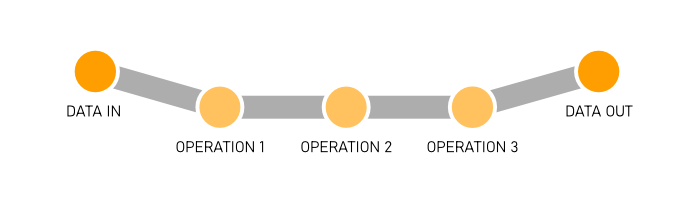
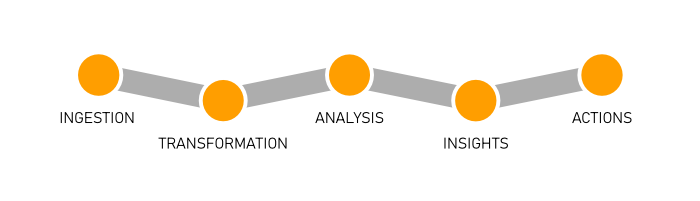
    <content type="html"><![CDATA[<h2 id="Overview"><a href="#Overview" class="headerlink" title="Overview"></a>Overview</h2><p>If you’re not already familiar with the concept of data streaming and the resources available in Azure on the topic, then please visit my article <a href="/streaming">Data Streaming at Scale in Azure</a> and review that first.</p><p>In short, data streaming is the movement of datagrams (events and messages) as a component of a software solution, and Azure offers Storage Queues, Service Bus Queues, Service Bus Topics, Event Hubs, and Event Grid as complementary components of a robust solution.</p><p>Data streaming is a pipeline, and very generally a pipeline looks like this…</p><p><img src="/files/stream-processing_01.png" title="general data pipeline"></p><p>Data comes into our solution, we perform operations to it, and then it reaches some terminal state - storage, a BI dashboard, or whatever.</p><p>More specifically, however, in many enterprise scenarios that pipeline looks more like this…</p><p><img src="/files/stream-processing_02.png" title="specific data pipeline"></p><h2 id="Ingestion"><a href="#Ingestion" class="headerlink" title="Ingestion"></a>Ingestion</h2><p>Ingestion is simply getting data into the system. This is, often times, moving bits from the edge (your location) to the cloud.</p><p>A natural fit for the ingestion step is Event Hubs. It’s excellent at that. Depending on the nature of the datagrams, however, you could use Service Bus Queues or Topics. You could use Storage Queues. You could even just use a Function with an HTTP trigger or a traditional web service if HTTP works in your case. There are a lot of ways to get data into the cloud, but there are only so many protocols.</p><h2 id="Transformation"><a href="#Transformation" class="headerlink" title="Transformation"></a>Transformation</h2><p>Transformation is merely changing the data shape to conform to the needs of the solution. It’s extremely common since systems that originate data tend to be as verbose as possible to make sure all information is captured. </p><p>One of the first tools a pipeline might employ is Azure Stream Analytics (ASA). ASA is good at transforming data and performing limited analysis. Stream Analytics projects one stream into another that is filtered, averaged, grouped, windowed, or more and it outputs the resulting stream one or more times.</p><p>ASA is very good at streams, but you still have to think about whether or not it’s the right job for data transformation. Often times, pumping data streams through a Function does the job, meets your solution’s performance requirements, and may make for a more friendly development environment and an easier management and operations story.</p><h2 id="Analysis-Insights-and-Actions"><a href="#Analysis-Insights-and-Actions" class="headerlink" title="Analysis, Insights, and Actions"></a>Analysis, Insights, and Actions</h2><p>Now I’m going to lump the remaining three into one category. They’re often (I’m generalizing) solved with processing of some kind.</p><p>Analysis is simply Study the data in various ways, insights are figuring out what the data means to future business, and then actions are the concrete steps we take to steer the business (guided by the insights) to effect positive change.</p><p>These steps require either some kind of managed integration (like Logic Apps or Flow) or a custom point of compute that gets triggered every time a datagram is picked up.</p><p>This custom point of compute could be your own process hosted either on a virtual machine or in a container or it could be an Azure Function.</p><p>The bulk of data analysis in years past has been retrospective - data is recorded and some weeks, months, or even years later, data scientists get a chance to look at it in creative ways to see what they can learn. That’s not good enough for modern business, which moves faster and demands more. We need to do analysis on the fly.</p><h2 id="Functions"><a href="#Functions" class="headerlink" title="Functions"></a>Functions</h2><p>An Azure Function is simply a function written in your language of choice, deployed to the cloud, possibly wired up to a variety of standard inputs and outputs, and triggered somehow so that the function runs when it’s supposed to.</p><p>Any given Function might be a serial component of your data pipeline so that every datagram that comes through passes through it. Or it might be a parallel branch that fires without affecting your main pipeline.</p><h3 id="Statelessness"><a href="#Statelessness" class="headerlink" title="Statelessness"></a>Statelessness</h3><p>Functions are stateless.</p><p>Imagine meeting with a person that has no memory, and then meeting with them again the next day. You’d have to bring with you to that meeting absolutely all of the context of whatever you were working on - including introductions!</p><p>If you were in the habit of meeting with people like that, you would be wise to make a practice of agreeing with them of a storage location where you could record everything you worked on. Then you would have to actually bring all of the paperwork with you each time.</p><p>Functions are like that. Each time you call them it’s a fresh call.</p><p>If you write a Function that doesn’t <em>need</em> any state - say to add a timestamp to any message it receives - then you’re as good as done. If you do need state, however, you have a couple of options.</p><h3 id="State"><a href="#State" class="headerlink" title="State"></a>State</h3><p>(storage)<br>(durable functions)<br>(durable entities)</p><h3 id="Scaling-Strategy"><a href="#Scaling-Strategy" class="headerlink" title="Scaling Strategy"></a>Scaling Strategy</h3><p>The whole point of Functions is scale, so you’d better get a deep understanding of Functions’ behavior when it comes to scaling. The <a href="https://docs.microsoft.com/en-us/azure/azure-functions/functions-scale">Azure Functions scale and hosting</a> article on Microsoft docs is an excellent resource.</p><p>If you’re using a trigger to integrate with one of the data streaming services we’re talking about, you’re using a <em>non-HTTP</em> trigger, so pay attention to the note under <a href="https://docs.microsoft.com/en-us/azure/azure-functions/functions-scale#understanding-scaling-behaviors">Understanding scaling behaviors</a>. In that case, new instances are allocated at most every 30 seconds.</p><p>If you’re expecting your application to start out with a huge ingress of messages and require a dozen instances right off the bat, keep in mind that it won’t actually reach that scale level for 6 minutes (12 x 30s).</p><h3 id="Triggers"><a href="#Triggers" class="headerlink" title="Triggers"></a>Triggers</h3><p>Most of the work of wiring your data stream up to Functions happens in the trigger. The trigger is the code that determines just how Functions gets new messages. It contains a few configuration options that attempt to fine tune that behavior, but at the end of the day if that behavior is not what you want, you’ll have to rely on another trigger, since custom triggers are not supported.</p><p>You might trigger your Function with a clock so that it fires every 15 minutes, or you might trigger it whenever a database record is created, or as in the topic at hand, whenever a datagram is created in your messaging pipeline.</p><p>Let’s focus in here on Functions that are reacting to our data streaming services: Storage Queues, Service Bus Queues, Service Bus Topics, and Event Hubs.</p><h4 id="Storage-Queue-Trigger"><a href="#Storage-Queue-Trigger" class="headerlink" title="Storage Queue Trigger"></a>Storage Queue Trigger</h4><p>The <a href="https://docs.microsoft.com/en-us/azure/azure-functions/functions-bindings-storage-queue">Storage Queue Trigger</a> is as simple as they come. You just wire it up to your Storage Queue by giving it your Queue’s name and connection string. The trigger gives you a few <a href="https://docs.microsoft.com/en-us/azure/azure-functions/functions-bindings-storage-queue#trigger---message-metadata">metadata properties</a>, though, that you can use to inspect incoming messages. Here they are…</p><ul><li><code>QueueTrigger</code> gives you the payload of the message (if it’s a string)</li><li><code>DequeueCount</code> tells you how many times a message has been pulled out of the queue and </li><li><code>ExpirationTime</code> tells you when the message expires</li><li><code>Id</code> that gives you a unique message ID.</li><li><code>InsertionTime</code> tells you exactly when the message made it into the queue</li><li><code>NextVisibleTime</code> is the next time the message will be visible</li><li><code>PopReceipt</code> gives you the message’s “pop receipt” (a pop receipt is like a handle on a message so you can pop it later)</li></ul><p>There are certain behaviors baked into all Function triggers. You have to study your trigger before you use it, so you know how it’s going to behave correctly and if you can configure it otherwise.</p><p>One of the behaviors of the Queue trigger is <em>retrying</em>. If your Function pulls a message off of the queue and fails for some reason, it keeps trying up to 5 tries total. After that, it adds a new message to the queue with with “poison” appended to the name, so you can log it or use some other logic. Messages are retried with what’s called an <em>exponential back-off</em>. That means the first time it retries a failed message it might wait 10 seconds, the next time it waits 30, then 1 minute, then 10. I don’t know what the actual values are, but that’s the idea.</p><p>The Queue trigger also has some particular behavior with regard to batching and concurrency. If the trigger finds a few messages in the queue, it will grab them all in a batch and then use multiple Function instances to process them. It’s very important to understand what the trigger is doing here, because there’s a decent chance your solution will benefit from some optimization. You can configure things like the batch size and threshold in the trigger configuration (in the <a href="https://docs.microsoft.com/en-us/azure/azure-functions/functions-host-json#queues"><code>host.json</code></a>).</p><p>The same Queue trigger can also be configured as an output binding in Functions so you can <em>write</em> queue messages as a result of your Function code.</p><p>I covered the Storage Queue trigger here in pretty good detail, but the remaining will have a lot in common conceptually.</p><h4 id="Service-Bus-Trigger"><a href="#Service-Bus-Trigger" class="headerlink" title="Service Bus Trigger"></a>Service Bus Trigger</h4><p>The <a href="https://docs.microsoft.com/en-us/azure/azure-functions/functions-bindings-service-bus">Service Bus Trigger</a> takes care of triggering a Function when a new message lands in your Service Bus Queue or Topic. There are plenty of nuances that we’ve uncovered in this trigger, though, so it’s worth spending some time looking at the trigger’s behavior in various configurations.</p><p>Take a look at the metadata properties that you get inside a Function that’s been triggered by the Service Bus Trigger…</p><ul><li>DeliveryCount</li><li>DeadLetterSource</li><li>ExpiresAtUtc</li><li>EnqueuedTimeUtc</li><li>MessageId</li><li>ContentType</li><li>ReplyTo</li><li>SequenceNumber</li><li>To</li><li>Label</li><li>CorrelationId</li></ul><p>You can read about all of those properties <a href="https://docs.microsoft.com/en-us/azure/azure-functions/functions-bindings-service-bus#trigger---message-metadata">in the docs</a>, but I’ll highlight a couple.<br>(highlight a couple)</p><p>(session enabled queues and subscriptions including the not-necessarily-intuitive scaling behavior around it)<br>(reference <a href="https://github.com/Azure/azure-functions-servicebus-extension/issues/16#issuecomment-491113458">this</a>)</p><h4 id="Event-Hub-Trigger"><a href="#Event-Hub-Trigger" class="headerlink" title="Event Hub Trigger"></a>Event Hub Trigger</h4><p>The <a href="https://docs.microsoft.com/en-us/azure/azure-functions/functions-bindings-event-hubs">Event Hub Trigger</a></p><p>(properties)<br>(differentiate from service bus behavior)</p><h2 id="Custom-Process"><a href="#Custom-Process" class="headerlink" title="Custom Process"></a>Custom Process</h2><p>(containers)<br>(reactive-x)</p><h2 id="Measuring-Latency"><a href="#Measuring-Latency" class="headerlink" title="Measuring Latency"></a>Measuring Latency</h2><p>link to the other blog post about measuring latency</p>]]></content>


    <summary type="html">&lt;h2 id=&quot;Overview&quot;&gt;&lt;a href=&quot;#Overview&quot; class=&quot;headerlink&quot; title=&quot;Overview&quot;&gt;&lt;/a&gt;Overview&lt;/h2&gt;&lt;p&gt;If you’re not already familiar with the concep</summary>


    <category term="Data" scheme="http://codefoster.com/categories/Data/"/>
    
    
    <category term="events" scheme="http://codefoster.com/tags/events/"/>
    
    <category term="streams" scheme="http://codefoster.com/tags/streams/"/>
    
    <category term="messaging" scheme="http://codefoster.com/tags/messaging/"/>
    
    <category term="eventing" scheme="http://codefoster.com/tags/eventing/"/>
    
    <category term="data streaming" scheme="http://codefoster.com/tags/data-streaming/"/>
    
  </entry>
  
  <entry>
    <title>Data Streaming at Scale in Azure</title>
    <link href="http://codefoster.com/streaming/"/>
    <id>http://codefoster.com/streaming/</id>
    <published>2019-08-28T00:00:00.000Z</published>
    <updated>2025-11-21T01:43:02.317Z</updated>
    
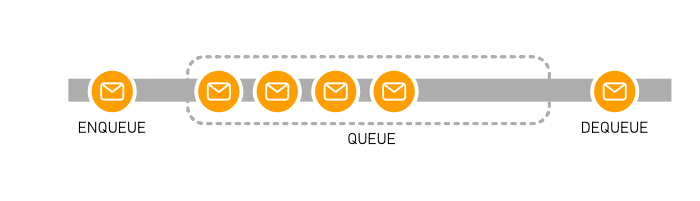
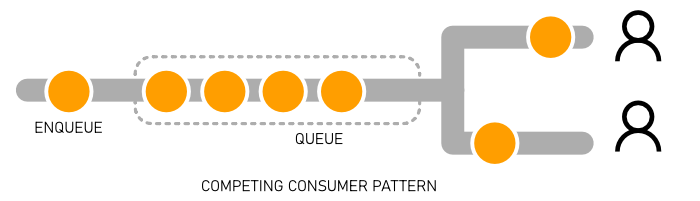
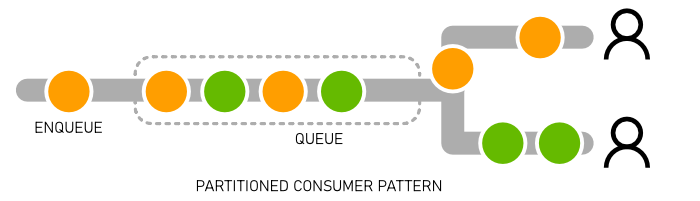
    <content type="html"><![CDATA[<h2 id="Overview"><a href="#Overview" class="headerlink" title="Overview"></a>Overview</h2><p>Many modern enterprise applications start with data generated by real world events like human interactions or regular sensor readings, and it’s often the modern developer’s job to design a system that will capture that data, move it quickly through some data pipeline, and then turn it into real insights that help the enterprise make decisions to improve business.</p><p>I’m going to generalize and call this concept <em>data streaming</em>. I’ll focus on <em>streaming</em> and will not cover things like <em>data persistence</em> or <em>data analysis</em>. I’m talking about the services that facilitate getting and keeping your data moving and performing operations on it while it’s in transit.</p><p>Data streaming is an extremely common solution component, and there’s a myriad of software services that exist to fulfill it. In fact, there are so many tools, that it’s often difficult to know where to start. But fear not. The whole point of this article is to introduce you to Azure’s data streaming services.</p><h2 id="Datagrams"><a href="#Datagrams" class="headerlink" title="Datagrams"></a>Datagrams</h2><p>When you’re streaming data, the payload is up to you. It might be very small like a heartbeat or very large like an entire blob. Often, streaming data is made up of <em>messages</em> or <em>events</em>. In this article, I’ll use the term <em>datagram</em> (lifted from Clemens Vasters’ <a href="https://azure.microsoft.com/en-us/blog/events-data-points-and-messages-choosing-the-right-azure-messaging-service-for-your-data/">article</a>) to refer abstractly to any payload whether you would consider it a message or an event.</p><p><img src="/files/streaming_01.png" title="datagrams"></p><p>What exactly is the difference between an <em>event</em> and a <em>message</em>. The official Azure documentation contains an article called <a href="https://docs.microsoft.com/en-us/azure/event-grid/compare-messaging-services">Choose between Azure messaging services - Event Grid, Event Hubs, and Service Bus</a> that does a great job with explaining this, so read that first, and then here’s my take.</p><p>An event is a bit like a system level notification. You and I get notifications on our mobile devices because we want to know what’s going on, right?</p><ul><li><p>The battery level just dropped to 15%. I want to know that so I can plug it in.</p></li><li><p>I just got a text message from Terry. I’ve been waiting to hear from her, so that’s significant.</p></li><li><p>Somebody outbid me on that auction item. I need to consider raising my bid.</p></li></ul><p>I might want events to be raised even if I don’t plan to respond to them right away too, because I might want to go back and study all of those events over time to make sense of them.</p><p>A set of events over time looks a bit like a history book, doesn’t it? You could react in real time as events occur, or you could get a list of all of last week’s events and you could essentially replay the entire week. Or you could do both! </p><p><img src="/files/streaming_05.png" title="events history book"></p><p>The battery level event example I brought up is a pretty simply event, right? Sometimes, however, events are more complicated and domain-specific, like “Your battery level is 5% less than your average level this time of day.” That kind of event takes some state tracking and data analysis. It’s really helpful though.</p><p>This is what I call <em>cascading events</em>. The first-level events are somewhat raw - mostly just sensor readings or low-level events that have fired. The next level is some fusion or aggregation of those events that’s higher level and often times more meaningful to an end user or business user - what we might call <em>domain events</em>. And, of course, events can cascade past 2 levels, and at the last level, it’s common to raise a notification - on a mobile device, a dashboard, or an email inbox.</p><p>Messages are different though.</p><p>Messages are more self-contained packages that relay some unit of information or a command complete with the details of that command.</p><p>I used the analogy of a history book to describe all of last week’s <em>events</em>. I suppose all of last week’s messages would be more like a playbook or a transaction log. Notice that my sample <em>messages</em> are more <em>present tense</em> and <em>directive</em>. That’s fairly typical for messages.</p><p><img src="/files/streaming_06.png" title="messages play book"></p><p>One of the defining characteristics of a message is that there is a coupling between the message producer and the consumer - that is, the producer has some expectation or even reliance on what the consumer will do with it. Clemens rightly <a href="https://azure.microsoft.com/en-us/blog/events-data-points-and-messages-choosing-the-right-azure-messaging-service-for-your-data/">states</a> that with events “the coupling is very loose, and removing these consumers doesn’t impact the source application’s functional integrity”. So, I can use that as a test. If I stop subscribing to the produced datagrams, will something break? If so, you’re dealing with messages as opposed to events.</p><h2 id="Data-Streaming-Services-in-Azure"><a href="#Data-Streaming-Services-in-Azure" class="headerlink" title="Data Streaming Services in Azure"></a>Data Streaming Services in Azure</h2><p>Let’s start with Azure’s data streaming services.</p><h3 id="Storage-Queues"><a href="#Storage-Queues" class="headerlink" title="Storage Queues"></a>Storage Queues</h3><p>Not to be confused with <em>Service Bus</em> Queues, Azure’s Storage Queues are perhaps the most primitive and certainly the oldest queue structure available.</p><p>In case you’re not familiar with the core concept of a queue, it would be good to explain that. A queue is a data structure that follows a <em>first-in first-out</em> (FIFO) access pattern - meaning that if you put Thing A, Thing B, and then Thing C in (in that order), and then you ask the queue for its next item, it will give you Thing A - first in… first out.</p><p><img src="/files/streaming_02.png" title="queue"></p><p>If you studied computer science and you weren’t sleeping during your <em>Data Structures</em> class, then you already know about queues.</p><p>Queues are extremely handy in cloud-first applications where it’s common to use one working process to set aside tasks for one or more other working processes to pick up and fulfill. This decoupling of task <em>production</em> from task <em>consumption</em> is a pinnacle concept in fulfilling the elasticity that cloud applications promise. Simply scaling your consumers up and down with your load allows you to pay exactly what you should and no more.</p><p>Storage Queues are not as robust as some of the other data streaming services in Azure, but sometimes they are simply all you need. Also, they’re delightfully inexpensive.</p><h3 id="Service-Bus-Queues"><a href="#Service-Bus-Queues" class="headerlink" title="Service Bus Queues"></a>Service Bus Queues</h3><p>Service Bus Queues are newer and far more robust than Storage Queues. There are some significant advantages including the ability to guarantee message ordering (there are some edge cases where Storage Queues can get messages out of order), role-based access, the use of the AMQP protocol instead of just HTTP, and extensibility.</p><p>To study the finer differences between Storage Queues and Service Bus Queues, read <a href="https://docs.microsoft.com/en-us/azure/service-bus-messaging/service-bus-azure-and-service-bus-queues-compared-contrasted">Storage queues and Service Bus queues - compared and contrasted</a>.</p><h3 id="Service-Bus-Topics"><a href="#Service-Bus-Topics" class="headerlink" title="Service Bus Topics"></a>Service Bus Topics</h3><p>Queues are the solution when you want one and only one worker to take a message out of the queue and process it. Think about incoming pizza orders where multiple workers are tasked with adding toppings. If one worker puts the anchovies on a pizza then it’s done, and the other workers should leave it alone.</p><p>Topics are quite different. Topics are the solution when you have messages that are occurring and one <em>or more</em> parties are interested. Think about a magazine subscription where it’s produced one time, but multiple people want to receive a copy. You often hear this referred to as a “publish/subscribe” pattern or simply “pubsub”. In this case, messages are pushed into a <em>topic</em> and zero to many parties are registered as being interested in that topic. The moment a new messages lands, the interested parties are notified and can do their processing.</p><p>When dealing with Service Bus Queues and Topics, you’ll hear some unique semantics. The terms <em>At Most Once</em>, <em>At Least Once</em>, and <em>Exactly Once</em> describe how many times a consumer is guaranteed to see a message and the nuances in how the service handles edge cases such as when it goes down while a message is in processing. <em>Peeking</em> at messages allows you to see what’s in the queue without actually <em>receiving</em> it. Whether consumers are peeking or actually receiving messages, <em>locks</em> are put in place to make sure other consumers leave it alone until it’s done. Finally, <em>deadlettering</em> is supported by Queues and Topics and allows messages to be set aside when, for whatever reason, consumers have been unable to process them.</p><h3 id="Event-Hubs"><a href="#Event-Hubs" class="headerlink" title="Event Hubs"></a>Event Hubs</h3><p>Now let’s take another view on processing data and look at <em>events</em> instead of <em>messages</em>.</p><p>Event Hub is Azure’s solution for facilitating massive scale event processing. It’s ability to get data into Azure is staggering. The <a href="https://azure.microsoft.com/en-us/services/event-hubs">feature page</a> states “millions of events per second”.</p><p>My understanding as to the differences between Service Bus and Event Hub has come in waves of understanding. Here’s how I understand it now.</p><p>Service Bus (both Queues and Topics) is a bit more of a <em>managed</em> solution. That is, the service is applying some opinion about your solution. Opinions, as you may know, <em>can</em> make a service dramatically easier to implement, but they can also constrain us as solution developers by tying us to specific assumed scenarios.</p><p>There are a lot of things that Service Bus does for us that Event Hubs does not attempt to do. It caches datagrams and keeps them for the configured time, but it doesn’t decorate them with any status, remember which have been processed, keep track of how many times a datagram has been accessed (<em>dequeued</em> in Service Bus parlance), lock those that have been looked at by any given consumer, or anything like that. It simply stores datagrams in a buffer and if the time runs out on a datagram in the buffer it drops it.</p><p>This puts the onus on an Event Hubs consumer to not only read events, but to figure out which ones have been read already.</p><p>This lack of management switches us from a pattern called <em>competing consumer</em> to one called <em>partitioned consumer</em>. With competing consumers, the service has to spend a bit of time making sure the competition is fair and goes well. With partitioned consumers, there’s just a clean rule regarding who gets what. So, if you can assume that there is no competition in your processing then you don’t need all the cumbersome status checking, dequeue counting, locking, etc. That’s why Event Hubs is super fast.</p><p><img src="/files/streaming_03.png" title="competing consumers"></p><p><img src="/files/streaming_04.png" title="partitioned consumers"></p><h3 id="Event-Grid"><a href="#Event-Grid" class="headerlink" title="Event Grid"></a>Event Grid</h3><p>Event Grid is newer than both Service Bus and Event Hubs, and it may not be readily apparent what its unique value offering is.</p><p>Start by reading Clemens Vaster’s excellent article <a href="https://azure.microsoft.com/en-us/blog/events-data-points-and-messages-choosing-the-right-azure-messaging-service-for-your-data/">Events, Data Points, and Messages - Choosing the right Azure messaging service for your data</a>.</p><p>Clemens calls Event Grid “event distribution” as opposed to “event streaming”. I like that.</p><p>Event Grid is a managed Azure platform with deep integration into the whole suite of Azure resources that creates a broad distribution of event publishers and subscribers between Azure services and even into non-Azure services.</p><p>Event Grid is not as much of a streaming solution as Event Hubs is. It’s highly performant, but it’s not tuned for the throughput you would expect to see in an Event Hubs solution.</p><p>It’s also a bit of a hybrid because it’s designed for events, but it has some of the management and features you find in Service Bus like deadlettering and <em>At Least Once</em> delivery.</p><h3 id="Stream-Analytics"><a href="#Stream-Analytics" class="headerlink" title="Stream Analytics"></a>Stream Analytics</h3><p>Together Service Bus, Event Hubs, and Event Grid make up the three primary datagram streaming platform services, but not far behind as far as central streaming services is Stream Analytics. Heck, it even has <em>Stream</em> in the name.</p><p>Stream Analytics uses SQL query syntax (modified to add certain streaming semantics like windowing) to analyze data as it’s moving.</p><p>Think about being tasked with counting the number of red Volkswagon vehicles that pass by some point on the highway. One crude approach would be to ask vehicles to pull over until a large parking lot were full, then perform the analysis, and then let those cars go while bringing new ones in. The obvious impact to traffic is analogous to the performance impact on a digital project - horrendous.</p><p>The better way is let the cars go and just count them up as they move unfettered. This is what Stream Analytics attempts to do.</p><h2 id="Measuring-Latency"><a href="#Measuring-Latency" class="headerlink" title="Measuring Latency"></a>Measuring Latency</h2><p>There are many points in the streaming process where delays may be introduced such as while…</p><ul><li>processing something in the producer before a message is sent</li><li>composing a message</li><li>getting the message to the streaming service</li><li>getting the message enqueued and ready for pickup</li><li>getting the message to the consumer</li><li>processing the message</li></ul><h2 id="Other-Mentionable-Azure-Data-Services"><a href="#Other-Mentionable-Azure-Data-Services" class="headerlink" title="Other Mentionable Azure Data Services"></a>Other Mentionable Azure Data Services</h2><p>There are a few other services in Azure that have more distant relationships to the concept of data streaming.</p><p>Data services and the often-nuanced differences between one another get truly dizzying. I have so much respect for a data expert’s ability to simply choose the right product for a given solution.</p><p>I have to mention <strong>IoT Edge</strong> and <strong>IoT Hub</strong>. In the wise words of <a href="https://twitter.com/bretstateham">Bret Stateham</a> “IoT is a data problem waiting to happen”. IoT Hub has an Event Hub endpoint that allows it to integrate with other data services in Azure.</p><p><strong>Data Lake</strong> is a great place to pump all of your structured or unstructured data to figure out what you’ll do with it next. A data <em>lake</em> is what you find at the end of a data <em>stream</em> - just like IRL!</p><p><strong>Databricks</strong> gives you the easiest Apache Spark cluster ever. With it you get a convenient notebook interface so you can collaborate and iterate on your data analysis strategies. Databricks is certainly a streaming solution, so if you’re wondering why I didn’t compare it more directly next Service Bus and Event Hub, it’s simply because it’s a very different beast and frankly I’m not overly familiar with it.</p><p><strong>Power BI</strong> is a business intelligence platform for visualizing data back to humans so that key decisions can be made. It’s worth a mention because it’s capable of receiving data streams and even updating visuals in near real-time.</p><p>When your data has been ingested, stored, analyzed, and trained, you drop it into <strong>SQL Data Warehouse</strong> - a column store database for big data analysis. Not much streaming at play at this stage of the solution, but it’s worth a mention.</p><h2 id="Conclusion"><a href="#Conclusion" class="headerlink" title="Conclusion"></a>Conclusion</h2><p>I did not bring the conclusion and closure to this research into streaming that I would have liked, but I wanted to get all of this work published in case it’s helpful.</p><p>If this is your debut into the concept of data streaming, then welcome to a rather interesting and fun corner of computer science.</p>]]></content>


    <summary type="html">&lt;h2 id=&quot;Overview&quot;&gt;&lt;a href=&quot;#Overview&quot; class=&quot;headerlink&quot; title=&quot;Overview&quot;&gt;&lt;/a&gt;Overview&lt;/h2&gt;&lt;p&gt;Many modern enterprise applications start with</summary>


    <category term="Data" scheme="http://codefoster.com/categories/Data/"/>
    
    
    <category term="events" scheme="http://codefoster.com/tags/events/"/>
    
    <category term="streams" scheme="http://codefoster.com/tags/streams/"/>
    
    <category term="messaging" scheme="http://codefoster.com/tags/messaging/"/>
    
    <category term="eventing" scheme="http://codefoster.com/tags/eventing/"/>
    
    <category term="data streaming" scheme="http://codefoster.com/tags/data-streaming/"/>
    
  </entry>
  
  <entry>
    <title>Fetch Azure FTP Credentials from the CLI</title>
    <link href="http://codefoster.com/azure-ftp-credentials/"/>
    <id>http://codefoster.com/azure-ftp-credentials/</id>
    <published>2019-06-24T00:00:00.000Z</published>
    <updated>2025-11-21T01:43:02.307Z</updated>
    
    <content type="html"><![CDATA[<p>This is one of those posts I’m writing for future me (hi, future me!).</p><p>If you have an Azure Web App and you want to get its <em>application</em>-level deployment credentials (as opposed to its user-level deployment credentials), you need to run two commands using the Azure CLI:</p><figure class="highlight bash"><table><tbody><tr><td class="code"><pre><span class="line"><span class="comment"># to get the FTP endpoint</span></span><br><span class="line">az webapp show -g &lt;resource group&gt; -n &lt;app name&gt; --query ftpPublishingUrl</span><br><span class="line"></span><br><span class="line"><span class="comment"># to get your credentials</span></span><br><span class="line">az webapp deployment list-publishing-credentials -n &lt;app name&gt; -g &lt;resource group&gt; --query <span class="string">'{name:name, publishingUserName:publishingUserName, publishingPassword:publishingPassword}'</span></span><br></pre></td></tr></tbody></table></figure><p>The second command will give you the three components you need for your username and password credentials. You use the <code>name</code> and <code>publishingUserName</code> together to make your username - like this <code>${name}\${publishingUserName}</code> in JavaScript template literal syntax, and you use the <code>publishingPassword</code> as the password.</p><p>That’s that!</p>]]></content>


    <summary type="html">&lt;p&gt;This is one of those posts I’m writing for future me (hi, future me!).&lt;/p&gt;
&lt;p&gt;If you have an Azure Web App and you want to get its &lt;em&gt;ap</summary>


    <category term="Azure" scheme="http://codefoster.com/categories/Azure/"/>
    
    
    <category term="cli" scheme="http://codefoster.com/tags/cli/"/>
    
    <category term="az" scheme="http://codefoster.com/tags/az/"/>
    
  </entry>
  
  <entry>
    <title>Semantic Selections and Why They Matter</title>
    <link href="http://codefoster.com/semantic-selections/"/>
    <id>http://codefoster.com/semantic-selections/</id>
    <published>2019-06-24T00:00:00.000Z</published>
    <updated>2025-11-21T01:43:02.316Z</updated>
    
    <content type="html"><![CDATA[<p>I’m a big fan of at least two things in life: <strong>writing code</strong> and <strong>being productive</strong>. On matters involving both I get downright giddy, and one such matter is <em>semantic selection</em>. VS Code calls them <a href="https://code.visualstudio.com/updates/v1_33#_smart-select-api">smart selections</a>, but whatever.</p><p>Semantic selection is overlooked by a lot of developers, but it’s a crying shame to overlook something so helpful. It’s like <a href="https://www.bing.com/videos/search?q=brian+regan+eyeglasses+instantly+improved+vision&amp;view=detail&amp;mid=BDDC50CDAE1000386E3EBDDC50CDAE1000386E3E&amp;FORM=VIRE">what comedian Brian Regan says about getting to the eye doctor</a>.</p><p>Semantic selection is a way to select the text of your code using the keyboard. Instead of treating every character the same, however, <em>semantic</em> selection uses insights regarding the symbols and other code constructs to (usually) select what you intended to select with far fewer keystrokes.</p><p>I used to rely heavily on this feature provided by ReSharper way back when I used heavy IDEs and all ;)</p><p>Some may ask why you would depend on the keyboard for making selections when you could just grab the mouse and drag over your characters from start to finish? Well, it’s my strong opinion that going for the mouse in an IDE is pretty much always a compromise - of your values at least but usually of time as well. That journey from keyboard to mouse and back is like a trans-Pacific flight. </p><blockquote><p>I can’t count the number of times I’ve watched over the shoulder as a developer carefully highlighted an entire line of text using the mouse and then jumped back to the keyboard to hit BACKSPACE. Learning the keyboard shortcut for deleting a line of text (<code>CTRL+SHIFT+K</code> in VS Code) can shave minutes off your day.</p></blockquote><p>Without features like semantic selection, however, selecting text using the keyboard alone can be arduous. For a long time, we’ve had <code>SHIFT</code> to make selections and <code>CTRL</code> to jump by word, but it’s still time consuming to get your cursor to the start and then to the end of your intended selection.</p><p>To fully convey the value of semantic selection, imagine you’re cursor is just after the last <code>n</code> of the <code>currentPerson</code> symbol in this code…</p><figure class="highlight ts"><table><tbody><tr><td class="code"><pre><span class="line"><span class="keyword">function</span> <span class="title function_">getPersonData</span>(<span class="params"></span>) {</span><br><span class="line">    <span class="keyword">var</span> result = <span class="title function_">requestData</span>(currentPerson, <span class="number">2</span>);</span><br><span class="line">}</span><br></pre></td></tr></tbody></table></figure><p>Now imagine you want change <code>currentPerson</code> to <code>currentContact</code>. With smart selection in VS Code, you would…</p><ol><li>Tap the left arrow one time to get your cursor into the <code>currentPerson</code> symbol (instead of on the trailing comma)</li><li>Hit <code>SHIFT+ALT+RIGHT ARROW</code> to expand the selection</li></ol><p>Now, notice what got highlighted - just the “Person” part of <code>currentPerson</code>. Smart selection is smart enough to know how camel case variable names work and just grab that. Now simply typing the word Contact will give you what you wanted.</p><p>What if you wanted to replace the entire variable name from <code>currentPerson</code> to say <code>nextContact</code>? For that you would simple hit <code>SHIFT+ALT+RIGHT ARROW</code> one more time to expand the selection by one more step. Now the entire variable is highlighted.</p><p>One more time to get the entire function signature.</p><p>Once more to get the function call.</p><p>Once more to get the entire statement on that line and again to get the whole line (which is quite common).</p><p>Once more to get the function body.</p><p>Once more to get the entire function.</p><p>That’s awesome, right?</p><p>Integrate this into your routine and shave minutes instead of yaks.</p><p>Happy coding!</p>]]></content>


    <summary type="html">&lt;p&gt;I’m a big fan of at least two things in life: &lt;strong&gt;writing code&lt;/strong&gt; and &lt;strong&gt;being productive&lt;/strong&gt;. On matters involving b</summary>


    <category term="Developer Tools" scheme="http://codefoster.com/categories/Developer-Tools/"/>
    
    
    <category term="productivity" scheme="http://codefoster.com/tags/productivity/"/>
    
    <category term="code" scheme="http://codefoster.com/tags/code/"/>
    
    <category term="vscode" scheme="http://codefoster.com/tags/vscode/"/>
    
  </entry>
  
  <entry>
    <title>Beautiful Cascading Node Config</title>
    <link href="http://codefoster.com/nodeconfig/"/>
    <id>http://codefoster.com/nodeconfig/</id>
    <published>2018-05-17T12:00:00.000Z</published>
    <updated>2025-11-21T01:43:02.313Z</updated>
    
    <content type="html"><![CDATA[<blockquote><p>FYI, this is a repost. I lost this post’s source markdown and just recreated it for posterity.</p></blockquote><p>I just learned something, which instantly makes it a good day.</p><p>I’ve been on the lookout for a really good pattern in Node.js projects to allow a user to…</p><ol><li><p>Define configuration variables in a JSON config file (not flat environment variables!)</p></li><li><p>Allow them to override the configuration variables with command line arguments</p></li><li><p>Make the command line arguments work like any good, modern CLI with double dash full names (i.e. <code>--foo bar</code>) or single dash aliases (i.e. <code>-f bar</code>)</p></li><li><p>Let the dev know if their code isn’t working because a certain configuration variable hasn’t been set</p></li></ol><p>Here’s what I have now.</p><figure class="highlight js"><table><tbody><tr><td class="code"><pre><span class="line"><span class="keyword">let</span> config = <span class="built_in">require</span>(<span class="string">'./arguments.json'</span>);</span><br><span class="line"><span class="keyword">const</span> commandLineArgs = <span class="built_in">require</span>(<span class="string">'command-line-args'</span>)</span><br><span class="line"></span><br><span class="line"><span class="comment">//override config with command line options  </span></span><br><span class="line"><span class="keyword">let</span> args = [</span><br><span class="line">    { <span class="attr">name</span>: <span class="string">'argumentA'</span>, <span class="attr">alias</span>: <span class="string">'a'</span>, <span class="attr">required</span>: <span class="literal">true</span> },</span><br><span class="line">    { <span class="attr">name</span>: <span class="string">'argumentB'</span>, <span class="attr">alias</span>: <span class="string">'b'</span>, <span class="attr">required</span>: <span class="literal">true</span> },</span><br><span class="line">    { <span class="attr">name</span>: <span class="string">'argumentC'</span>, <span class="attr">alias</span>: <span class="string">'c'</span> }</span><br><span class="line">];</span><br><span class="line">config = { ...config, ...<span class="title function_">commandLineArgs</span>(args) };</span><br><span class="line"></span><br><span class="line"><span class="comment">//throw errors if any required arguments are missing</span></span><br><span class="line">args.<span class="title function_">filter</span>(<span class="function"><span class="params">a</span> =&gt;</span> a.<span class="property">required</span> &amp;&amp; !config[a.<span class="property">name</span>]).<span class="title function_">forEach</span>(<span class="function"><span class="params">a</span> =&gt;</span> {</span><br><span class="line">    <span class="keyword">throw</span> <span class="keyword">new</span> <span class="title class_">Error</span>(<span class="string">`A <span class="subst">${a.name}</span> argument must be provided either in a device.json file or as a command line argument.`</span>);</span><br><span class="line">})</span><br></pre></td></tr></tbody></table></figure><p>So, the <code>arguments.json</code> file that we bring in is a place we can define arguments permanently so they don’t have to be included on the command line.</p><p>Then we pull in a dependency on the <code>command-line-args</code> package. I was delighted to discover that this package works exactly like I expected it too. For each argument, we can give it a long name (i.e. <code>argumentA</code>) and a short name (i.e. <code>a</code>). Finally, I added the <code>required</code> property myself, which I’ll show you in a second.</p><p>Next, I coerce these two sources of configuration values using a spread operator. I talked a lot more about spread operators in my <a href="http://codefoster.com/levelup-es6">Level Up Your JavaScript Game! - Other ES6 Language Features</a> post. The order of these two spread objects is such that it will take the values in my file first, but then override them with command line arguments if they exist.</p><p>Finally, I added another little trick that wasn’t built in to the <code>command-line-args</code> package (although I think it should be). I added the ability to make certain arguments required, and if not to throw an error so the user knows exactly why things don’t work.</p><p>That’s all!</p>]]></content>


    <summary type="html">&lt;blockquote&gt;
&lt;p&gt;FYI, this is a repost. I lost this post’s source markdown and just recreated it for posterity.&lt;/p&gt;
&lt;/blockquote&gt;
&lt;p&gt;I just l</summary>


    <category term="Node.js" scheme="http://codefoster.com/categories/Node-js/"/>
    
    
    <category term="javascript" scheme="http://codefoster.com/tags/javascript/"/>
    
    <category term="node" scheme="http://codefoster.com/tags/node/"/>
    
    <category term="args" scheme="http://codefoster.com/tags/args/"/>
    
    <category term="config" scheme="http://codefoster.com/tags/config/"/>
    
    <category term="developer-joy" scheme="http://codefoster.com/tags/developer-joy/"/>
    
    <category term="typescript" scheme="http://codefoster.com/tags/typescript/"/>
    
  </entry>
  
  <entry>
    <title>TypeScript for Documentation</title>
    <link href="http://codefoster.com/typescript-docs/"/>
    <id>http://codefoster.com/typescript-docs/</id>
    <published>2018-04-13T00:00:00.000Z</published>
    <updated>2025-11-21T01:43:02.318Z</updated>
    
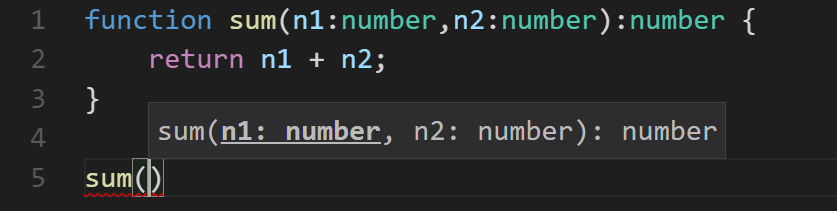
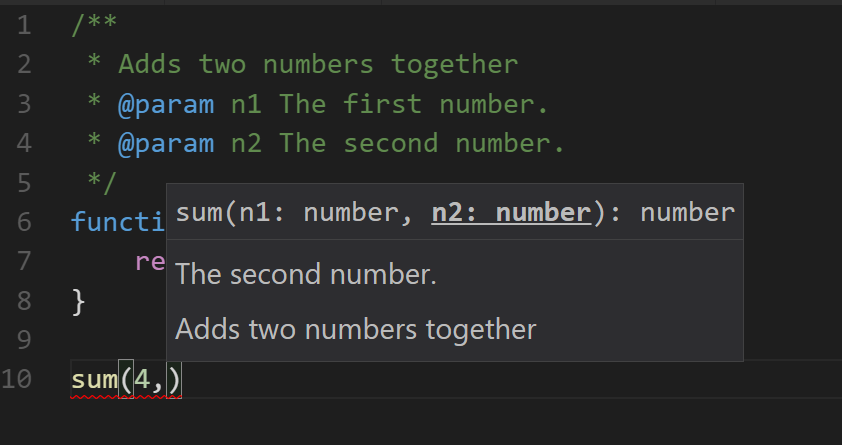
    <content type="html"><![CDATA[<p>TypeScript is wonderful for a variety of reasons and there’s one I want to hightlight right now.</p><p>TypeScript allows a developer or team to sprinkle types in to their codebase. These types make it much easier for your IDE to tell you you’re doing something you don’t intend to do in your logic. That’s excellent.</p><p>But the types also document your codebase well.</p><p>Here’s a function without types…</p><figure class="highlight js"><table><tbody><tr><td class="code"><pre><span class="line"><span class="keyword">function</span> <span class="title function_">sum</span>(<span class="params">n1, n2</span>) {</span><br><span class="line">    <span class="keyword">return</span> n1 + n2;</span><br><span class="line">}</span><br></pre></td></tr></tbody></table></figure><p>And then with types…</p><figure class="highlight ts"><table><tbody><tr><td class="code"><pre><span class="line"><span class="keyword">function</span> <span class="title function_">sum</span>(<span class="params"><span class="attr">n1</span>: <span class="built_in">number</span>,<span class="attr">n2</span>: <span class="built_in">number</span></span>): <span class="built_in">number</span> {</span><br><span class="line">    <span class="keyword">return</span> n1 + n2;</span><br><span class="line">}</span><br></pre></td></tr></tbody></table></figure><p>And the obvious advantage is that at a glance, I as a human can see what kinds of variables this function is expecting and what it’s going to give me back.</p><p>Additionally, my IDE can inspect these types and give me some information about the expected parameter types without even make the journey to the source code to look…</p><p><img src="/files/typescript-docs_01.png"></p><p>I can take that a step further and add some comments to the source and get even better descriptions.</p><p><img src="/files/typescript-docs_02.png"></p><p>And now I can be more awesome.</p>]]></content>


    <summary type="html">&lt;p&gt;TypeScript is wonderful for a variety of reasons and there’s one I want to hightlight right now.&lt;/p&gt;
&lt;p&gt;TypeScript allows a developer or </summary>


    <category term="JavaScript" scheme="http://codefoster.com/categories/JavaScript/"/>
    
    
    <category term="documentation" scheme="http://codefoster.com/tags/documentation/"/>
    
    <category term="developer-joy" scheme="http://codefoster.com/tags/developer-joy/"/>
    
    <category term="typescript" scheme="http://codefoster.com/tags/typescript/"/>
    
    <category term="types" scheme="http://codefoster.com/tags/types/"/>
    
  </entry>
  
  <entry>
    <title>A Simple Brain</title>
    <link href="http://codefoster.com/simple-brain/"/>
    <id>http://codefoster.com/simple-brain/</id>
    <published>2018-03-26T00:00:00.000Z</published>
    <updated>2025-11-21T01:43:02.316Z</updated>
    
    <content type="html"><![CDATA[<p>I’m not (yet) an expert in machine learning, but like so many I recognize that it’s an incredibly integral part of our future.</p><p>Right now, most data insights are the result of some significant effort - a lot of data, a lot of training, and perhaps a significant amount of time spent by data scientists. </p><p>I anticipate that insights are going to come not only out of these large projects, but out of the small workflows as well. For example, your average web developer may tend to create some marketing information and some web forms online, but in the future, they’ll also apply some machine learning.</p><p>I have been dabbling with <a href="https://github.com/brainjs/brain.js">Brain.js</a> lately, and I wonder if something like this might be a good compliment to some of the massive capability available in very high scale machine learning solutions. Brain.js is just JavaScript, and sometimes that’s all you need - something that will run in small quantity in the browser!</p><p>So I copied some code from the Brain.js website and regurgitated it here for your benefit. I also put it into my repo <a href="https://github.com/codefoster/simple-brain">simple-brain</a>.</p><p>Here’s the code…</p><figure class="highlight js"><table><tbody><tr><td class="code"><pre><span class="line"><span class="keyword">const</span> brain = <span class="built_in">require</span>(<span class="string">'brain.js'</span>);</span><br><span class="line"></span><br><span class="line"><span class="keyword">var</span> net = <span class="keyword">new</span> brain.<span class="title class_">NeuralNetwork</span>();</span><br><span class="line"></span><br><span class="line"><span class="variable language_">console</span>.<span class="title function_">log</span>(<span class="string">"The following neural network implements an XOR (exclusive OR) logical operation, where the output will be true when the inputs are neither all false or all true."</span>);</span><br><span class="line"><span class="variable language_">console</span>.<span class="title function_">log</span>(<span class="string">"Training the model..."</span>);</span><br><span class="line">net.<span class="title function_">train</span>([</span><br><span class="line">    { <span class="attr">input</span>: [<span class="number">0</span>, <span class="number">0</span>], <span class="attr">output</span>: [<span class="number">0</span>] },</span><br><span class="line">    { <span class="attr">input</span>: [<span class="number">0</span>, <span class="number">1</span>], <span class="attr">output</span>: [<span class="number">1</span>] },</span><br><span class="line">    { <span class="attr">input</span>: [<span class="number">1</span>, <span class="number">0</span>], <span class="attr">output</span>: [<span class="number">1</span>] },</span><br><span class="line">    { <span class="attr">input</span>: [<span class="number">1</span>, <span class="number">1</span>], <span class="attr">output</span>: [<span class="number">0</span>] }</span><br><span class="line">]);</span><br><span class="line"></span><br><span class="line"></span><br><span class="line"><span class="variable language_">console</span>.<span class="title function_">log</span>(<span class="string">"Evaluating [1, 1] against the model (should approach 0)..."</span>);</span><br><span class="line"><span class="variable language_">console</span>.<span class="title function_">log</span>(net.<span class="title function_">run</span>([<span class="number">1</span>, <span class="number">1</span>]));</span><br><span class="line"></span><br><span class="line"><span class="variable language_">console</span>.<span class="title function_">log</span>(<span class="string">"Evaluating [1, 0] against the model (should approach 1)..."</span>);</span><br><span class="line"><span class="variable language_">console</span>.<span class="title function_">log</span>(net.<span class="title function_">run</span>([<span class="number">1</span>, <span class="number">0</span>]));</span><br></pre></td></tr></tbody></table></figure><p>I’m learning a lot about ML right now and it’s fun to have a new space to learn and explore. It’s fun too that ML has a bit of a presence in the JavaScript world even though the Python leaning is strong. I found <a href="https://blog.bitsrc.io/11-javascript-machine-learning-libraries-to-use-in-your-app-c49772cca46c">this excellent</a> article by Jonathan who’s as crazy as I am to consider JS for ML at this time.</p>]]></content>


    <summary type="html">&lt;p&gt;I’m not (yet) an expert in machine learning, but like so many I recognize that it’s an incredibly integral part of our future.&lt;/p&gt;
&lt;p&gt;Rig</summary>


    <category term="Machine Learning" scheme="http://codefoster.com/categories/Machine-Learning/"/>
    
    
    <category term="ml" scheme="http://codefoster.com/tags/ml/"/>
    
    <category term="ai" scheme="http://codefoster.com/tags/ai/"/>
    
    <category term="dnn" scheme="http://codefoster.com/tags/dnn/"/>
    
    <category term="regression" scheme="http://codefoster.com/tags/regression/"/>
    
    <category term="supervised" scheme="http://codefoster.com/tags/supervised/"/>
    
    <category term="brain" scheme="http://codefoster.com/tags/brain/"/>
    
    <category term="brain.js" scheme="http://codefoster.com/tags/brain-js/"/>
    
  </entry>
  
  <entry>
    <title>Zoom in Windows</title>
    <link href="http://codefoster.com/zoom/"/>
    <id>http://codefoster.com/zoom/</id>
    <published>2018-03-26T00:00:00.000Z</published>
    <updated>2025-11-21T01:43:02.319Z</updated>
    
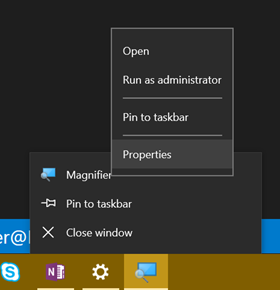
    <content type="html"><![CDATA[<p>I do a lot of presentations. The only thing I like more than writing code is <em>talking</em> about writing code.</p><p>I’ve always had a little angst about zooming my screen though because…</p><ul><li><p>The built-in Windows Magnifier seemed to get in my way</p></li><li><p>The excellent and popular Zoom It tool requires an extra install and I never seem to have it running when my presentation starts.</p></li></ul><p>I recently discovered, though, a couple of options that make theh built-in Windows Magnifier work way better for me.</p><p>First, I looked up the keyboard shortcuts and beyond the basics of <code>WIN + =</code> for zooming in and <code>WIN + -</code> for zooming out, you can use <code>WIN + ESC</code> to exit the zoom altogether. Prior to discovering that, I thought it was necessary to zoom all the way back out. I also found that <code>CTRL + ALT + Mouse Wheel</code> works to zoom in and out with your mouse.</p><p>Now, my biggest aggravation with the Magnifier was how the UI rendered every time I performed a zoom. There’s a Magnifier settings to “Collapse to magnifying glass icon”. That’s better than the full window, but it’s still fairly obtrusive. So here’s the trick.</p><ol><li><p>Start Magnifier so the icon appears on the Task Bar.</p></li><li><p>Now right click on the Magnifier icon, right click on the Magnifier entry in the context menu, and hit Properties.</p><p> <img src="/../files/zoom_01.png"></p></li><li><p>Now set Run to Minimized</p><p> <img src="/..%5Cfiles%5Czoom_02.png"></p></li></ol><p>That’s it. Now when you hit <code>WIN + =</code> to zoom in, the screen zooms in to the mouse cursor and doesn’t render any obtrusive UI.</p><p>It’s the simple things that light me up!</p><blockquote><p>Quick note. A colleague just read and tried this and it didn’t seem to work for him. I tried it again and the behavior is not exactly like I indicated in this post. I spent some time trying to figure out exactly what’s up, and I figured out that if the magnifier is <em>not</em> running, then it will still create the UI. If you check the box I mentioned to earlier - Collapse to magnifying glass icon - the UI is smaller, but it’s still there. The application is not active, but if it happens to show up where your cursor is, then it’s still obstructive. So, I am going to submit this feedback to the Windows team to see if I can be an advocate of change. It does help if you move the Magnifier’s window to a remote area of the screen, and you can also just minimize it, but both of those take a little effort. Anyway, we’ll get this figured out :) </p></blockquote><blockquote><p>Okay, folks. I submitted this feedback via Windows Feedback and it was promoted to bug 16580796 within the hour. Impressed. Fingers crossed this is fixed in the next Windows update.</p></blockquote>]]></content>


    <summary type="html">&lt;p&gt;I do a lot of presentations. The only thing I like more than writing code is &lt;em&gt;talking&lt;/em&gt; about writing code.&lt;/p&gt;
&lt;p&gt;I’ve always had </summary>


    <category term="Productivity" scheme="http://codefoster.com/categories/Productivity/"/>
    
    
    <category term="zoom" scheme="http://codefoster.com/tags/zoom/"/>
    
    <category term="magnifier" scheme="http://codefoster.com/tags/magnifier/"/>
    
  </entry>
  
  <entry>
    <title>Level Up Your JavaScript Game! - Other ES6 Language Features</title>
    <link href="http://codefoster.com/levelup-es6/"/>
    <id>http://codefoster.com/levelup-es6/</id>
    <published>2018-02-21T09:31:08.000Z</published>
    <updated>2025-11-21T01:43:02.312Z</updated>
    
    <content type="html"><![CDATA[<blockquote><p>See <a href="/levelup">Level Up Your JavaScript Game!</a> for related content.</p></blockquote><p>Sometimes it takes a while to learn new language features, because many are semantic improvements that aren’t absolutely necessary to get work done. Learning new features right away though is a great way to get ahead. Putting off learning new features leaves you lagging the crowd and constantly feeling like you’re catching up. I’ve noticed that junior developers often know more modern language features than senior developers.</p><p>There are quite a few language features that were introduced in ES5 and ES6, and you’d be well off to learn them all! Certainly, though, look into at least the ones I’m going to talk about here. I recommend you learn…</p><h2 id="…to-effectively-use-the-object-and-array-spread-operators"><a href="#…to-effectively-use-the-object-and-array-spread-operators" class="headerlink" title="…to effectively use the object and array spread operators."></a>…to effectively use the object and array spread operators.</h2><p>From <a href="https://developer.mozilla.org/en-US/docs/Web/JavaScript/Reference/Operators/Spread_syntax">MDN</a>: “Spread syntax allows an iterable such as an array expression or string to be expanded in places where zero or more arguments (for function calls) or elements (for array literals) are expected, or an object expression to be expanded in places where zero or more key-value pairs (for object literals) are expected.”</p><blockquote><p>The spread operator is an ellipsis (<code>...</code>), but don’t confuse it with the pre-existing rest operator (also an ellipsis). The rest operator is used in the argument list of a function <em>definition</em>. The spread operator on the other hand is used… well, I’ll show you.</p></blockquote><p>Think of the spread operator’s function as breaking the elements of an array (or the properties of an object) out into a comma delimited list. So <code>[1,2,3]</code> becomes <code>1,2,3</code>. The <em>array</em> spread operator is most helpful for either passing elements to a function call as arguments or constructing a new array. The <em>object</em> spread operator is most helpful for constructing or merging objects properties.</p><p>If you have an array of values, you can pass them to a function call as separate arguments like this…</p><figure class="highlight js"><table><tbody><tr><td class="code"><pre><span class="line"><span class="title function_">myFunction</span>(...[<span class="number">1</span>,<span class="number">2</span>,<span class="number">3</span>]);</span><br><span class="line"><span class="comment">//equivalent to myFunction(1,2,3)</span></span><br></pre></td></tr></tbody></table></figure><p>If you have two objects - A and B - and you want C to be a superset of the properties on A and B you do this…</p><figure class="highlight js"><table><tbody><tr><td class="code"><pre><span class="line"><span class="keyword">let</span> C = {...A, ...B};</span><br></pre></td></tr></tbody></table></figure><p>Therefore…</p><figure class="highlight js"><table><tbody><tr><td class="code"><pre><span class="line">{...{<span class="string">"name"</span>:<span class="string">"Sally"</span>},...{<span class="string">"age"</span>:<span class="number">10</span>}}</span><br><span class="line"><span class="comment">//{"name":"Sally", "age":10}</span></span><br></pre></td></tr></tbody></table></figure><h2 id="…to-get-into-the-habit-of-using-destructuring-where-appropriate"><a href="#…to-get-into-the-habit-of-using-destructuring-where-appropriate" class="headerlink" title="…to get into the habit of using destructuring where appropriate."></a>…to get into the habit of using destructuring where appropriate.</h2><p>Destructuring looks like magic when you first see it. It’s not just a gimmick, though. It’s quite useful.</p><p>Destructuring allows you to assign variables (on the left hand side of the assignment operator (<code>=</code>)) using an object or array pattern. The assignment will use the pattern you provide to extract values out of an object or array and put them where you want them.</p><figure class="highlight js"><table><tbody><tr><td class="code"><pre><span class="line"><span class="keyword">let</span> {name,age} = {<span class="attr">name</span>:<span class="string">"Sally"</span>,<span class="attr">age</span>:<span class="number">10</span>};</span><br><span class="line"><span class="comment">//name == "Sally"</span></span><br><span class="line"><span class="comment">//age == 10</span></span><br></pre></td></tr></tbody></table></figure><p>That’s a lot better than the alternative…</p><figure class="highlight js"><table><tbody><tr><td class="code"><pre><span class="line"><span class="keyword">let</span> person = {<span class="attr">name</span>:<span class="string">"Sally"</span>,<span class="attr">age</span>:<span class="number">10</span>};</span><br><span class="line"><span class="keyword">let</span> name = person.<span class="property">name</span>;</span><br><span class="line"><span class="keyword">let</span> age = person.<span class="property">age</span>;</span><br></pre></td></tr></tbody></table></figure><p>It works with nested properties too…</p><figure class="highlight js"><table><tbody><tr><td class="code"><pre><span class="line"><span class="keyword">let</span> {name,address.<span class="property">zip</span>:zip} = {<span class="attr">name</span>:<span class="string">"Sally"</span>,<span class="attr">age</span>:<span class="number">10</span>,<span class="attr">address</span>:{<span class="attr">city</span>:<span class="string">"Seattle"</span>,<span class="attr">zip</span>:<span class="number">12345</span>}};</span><br><span class="line"><span class="comment">//name == "Sally"</span></span><br><span class="line"><span class="comment">//zip == 12345</span></span><br></pre></td></tr></tbody></table></figure><p>It works with arrays too…</p><figure class="highlight js"><table><tbody><tr><td class="code"><pre><span class="line"><span class="keyword">let</span> [first,,third] = [<span class="string">"apple"</span>,<span class="string">"orange"</span>,<span class="string">"banana"</span>,<span class="string">"kiwi"</span>]</span><br><span class="line"><span class="comment">// first == "apple"</span></span><br><span class="line"><span class="comment">// third == "banana"</span></span><br></pre></td></tr></tbody></table></figure><p>Destructuring is handy when you’ve fetched an object or array and need to use a subset of it’s properties or elements. If your webservice call returns a huge object, destructuring will help you pull out just the parts you actually care about.</p><p>Destructuring is also handy when creating <em>mixins</em> - objects that you wish to sprinkle functionality into by adding certain properties or functions.</p><p>Destructuring is also handy when you’re manipulating array elements.</p><h2 id="…to-use-template-literals-in-most-of-your-string-compositions"><a href="#…to-use-template-literals-in-most-of-your-string-compositions" class="headerlink" title="…to use template literals in most of your string compositions."></a>…to use template literals in <em>most</em> of your string compositions.</h2><p>I recommend you get in the habit of defining string literals with the backtick (`) operator. These strings are called <em>template literals</em> and they do some great things for us.</p><p>First, they allow us to line wrap our string literal without using any extra operators. So as opposed to the existing method…</p><figure class="highlight js"><table><tbody><tr><td class="code"><pre><span class="line"><span class="keyword">let</span> pet = <span class="string">"{"</span> +</span><br><span class="line">    <span class="string">"name:\"Jim\","</span> +</span><br><span class="line">    <span class="string">"type:\"dog\","</span> +</span><br><span class="line">    <span class="string">"age:8"</span> +</span><br><span class="line"><span class="string">"}"</span></span><br></pre></td></tr></tbody></table></figure><p>…we can use…</p><figure class="highlight js"><table><tbody><tr><td class="code"><pre><span class="line"><span class="keyword">let</span> pet = <span class="string">`{</span></span><br><span class="line"><span class="string">    name:"Jim",</span></span><br><span class="line"><span class="string">    type:"dog",</span></span><br><span class="line"><span class="string">    age:8</span></span><br><span class="line"><span class="string">}`</span></span><br></pre></td></tr></tbody></table></figure><p>Elegant!</p><h2 id="…to-understand-the-nuances-of-lambda-functions-aka-fat-arrow-functions"><a href="#…to-understand-the-nuances-of-lambda-functions-aka-fat-arrow-functions" class="headerlink" title="…to understand the nuances of lambda (=>) functions (aka fat-arrow functions)."></a>…to understand the nuances of lambda (=&gt;) functions (aka fat-arrow functions).</h2><p>And it looks like I’ve saved one of the best for last, because lambdas have so dramatically increased code concision. Not to overstate it, but lambda functions delight me.</p><p>I was introduced to lambda functions in C#. I distinctly remember one day in particular asking a fellow developer to explain what they are and when you would use one. I distinctly remember not getting it. Man, I’ve written a lot of lambda functions since then!</p><p>The main offering of the lambda is, in my opinion, the concision. Concise code is readible code, grokkable code, maintainable code.</p><p>They don’t replace standard functions or class methods, but they mostly replace anonymous functions in case you’re familiar with those. I very rarely use anonymous functions anymore. They’re great for those functions you end up passing around in JavaScript, because… well, JavaScript. You use them in scenarios like passing a callback to an asynchronous function.</p><p>Allow me to demonstrate how much more concise a lambda function is.</p><p>Here’s a call to that readFile function we were using in an earlier post. This code uses a pattern where functions are explicitly defined before being passed as callbacks. This is the most verbose pattern.</p><figure class="highlight js"><table><tbody><tr><td class="code"><pre><span class="line">fs.<span class="title function_">readFile</span>(<span class="string">'myfile.txt'</span>, readFileCallback);</span><br><span class="line"></span><br><span class="line"><span class="keyword">function</span> <span class="title function_">readFileCallback</span>(<span class="params">contents</span>) {</span><br><span class="line">    <span class="comment">//do something with the contents</span></span><br><span class="line">}</span><br></pre></td></tr></tbody></table></figure><p>Now let’s convert that function an anonymous function to save some lines of code. This is recommended unless of course you’re paid by the line of code.</p><figure class="highlight js"><table><tbody><tr><td class="code"><pre><span class="line">fs.<span class="title function_">readFile</span>(<span class="string">'myfile.txt'</span>, <span class="keyword">function</span>(<span class="params">contents</span>) {</span><br><span class="line">    <span class="comment">//do something with the contents</span></span><br><span class="line">});</span><br><span class="line"></span><br></pre></td></tr></tbody></table></figure><p>Notice that the function name went away. I for one strongly dislike the first pattern. When a callback function is only used once, I feel like it belongs inline with the function call. If of course, you’re reusing a function for a callback then that’s a different story.</p><p>Now let’s go big! Or small, rather. Let’s turn our anonymous function into a lambda.</p><figure class="highlight js"><table><tbody><tr><td class="code"><pre><span class="line">fs.<span class="title function_">readFile</span>(<span class="string">'myfile.txt'</span>, <span class="function"><span class="params">txt</span> =&gt;</span> {</span><br><span class="line">    <span class="comment">//do something with the txt</span></span><br><span class="line">})</span><br></pre></td></tr></tbody></table></figure><p>I love it! Notice, we were able to do away with the <code>function</code> keyword altogether and we specified it’s argument list (in this case only a single argument) on its own. Notice too that I called that argument <code>txt</code>. I could have, of course, kept the name <code>contents</code>, but I tend to use short (often only a single letter) arguments in lambda functions to amplify the brevity. Lambda functions are very rarely complex, so this works out well.</p><p>The loss of the function name and keyword saved some characters, but lambda functions get even shorter. If a lambda contains only a single expression, the curly braces can be dropped. The expression in this case becomes the return value of the lambda.</p><p>To illustrate, let me use a new example - this one from <a href="/levelup-arrays">my post on arrays</a> in this series…</p><figure class="highlight js"><table><tbody><tr><td class="code"><pre><span class="line"><span class="keyword">let</span> numbers = [<span class="number">1</span>,<span class="number">2</span>,<span class="number">3</span>,<span class="number">4</span>,<span class="number">5</span>,<span class="number">6</span>];</span><br><span class="line"><span class="keyword">let</span> smallNumbers = numbers.<span class="title function_">filter</span>(<span class="function"><span class="params">n</span> =&gt;</span> n &lt;= <span class="number">3</span>);</span><br></pre></td></tr></tbody></table></figure><p>In this example, <code>n =&gt; n &lt;= 3</code> is a complete lambda function. I know, concise right?! This example illustrates the value of the single letter arguments and also introduces you to the expression syntax. The <em>body</em> of the lambda is <code>n &lt;= 3</code>. That’s an <em>expression</em>. It’s not a statement such as…</p><figure class="highlight js"><table><tbody><tr><td class="code"><pre><span class="line"><span class="keyword">let</span> n = <span class="number">3</span>;</span><br></pre></td></tr></tbody></table></figure><p>And it’s not a block of statements such as…</p><figure class="highlight js"><table><tbody><tr><td class="code"><pre><span class="line">{</span><br><span class="line">    <span class="keyword">let</span> m = <span class="number">3</span>;</span><br><span class="line">    <span class="keyword">let</span> n = <span class="number">4</span>;</span><br><span class="line">    <span class="keyword">let</span> o = <span class="number">5</span>;</span><br><span class="line">}</span><br></pre></td></tr></tbody></table></figure><p>…and like I said, when the body of your lambda is a simple express, you can drop the curly braces and the expression becomes your return value.</p><p>So in the example, the <code>.filter()</code> function wants a function which evaluates to <code>true</code> or <code>false</code>. Our expression <code>n &lt;= 3</code> does just that, and returns the result.</p><p>There are two caveats that I’ll draw out.</p><p>First, if you have 1 argument in your lambda function, you do not need parenthesis around the argument list. In our previous example, <code>n =&gt; n &lt;= 3</code> is a good example of that. If you have 0 arguments or more than 1 argument, however, you do. These are all valid…</p><figure class="highlight js"><table><tbody><tr><td class="code"><pre><span class="line">() =&gt; <span class="variable language_">console</span>.<span class="title function_">log</span>(<span class="string">'go!'</span>) <span class="comment">//0 arguments</span></span><br><span class="line">x =&gt; x * x <span class="comment">//1 argument</span></span><br><span class="line">(a,b) =&gt; a + b <span class="comment">//2 arguments</span></span><br><span class="line">(prefix, firstName, lastName) =&gt; <span class="string">`<span class="subst">${lastName}</span>, <span class="subst">${prefix}</span> <span class="subst">${firstName}</span>`</span> <span class="comment">//3 arguments</span></span><br></pre></td></tr></tbody></table></figure><blockquote><p>If you use TypeScript, you may notice that the presence of a type on a single argument lambda function requires you to wrap it with parenthesis as well, such as <code>(x:number) =&gt; x * x</code>.</p></blockquote><p>The second caveat is when your lambda returns an expression, but that expression is an object literal wrapped in curly braces (<code>{}</code>). In this case, the compiler confuses your intention to return an object with an intention to create a statement block.</p><p>This, then, is <em>not</em> valid…</p><figure class="highlight js"><table><tbody><tr><td class="code"><pre><span class="line"><span class="keyword">let</span> <span class="title function_">generatePerson</span> = (<span class="params">first,last</span>) =&gt; {<span class="attr">name</span>:<span class="string">`<span class="subst">${first}</span> <span class="subst">${last}</span>`</span>}</span><br></pre></td></tr></tbody></table></figure><p>To direct the compiler just do what you always did in complex mathematical statements in high school - add some more parenthesis! We could correct this as so…</p><figure class="highlight js"><table><tbody><tr><td class="code"><pre><span class="line"><span class="keyword">let</span> <span class="title function_">generatePerson</span> = (<span class="params">first,last</span>) =&gt; ({<span class="attr">name</span>:<span class="string">`<span class="subst">${first}</span> <span class="subst">${last}</span>`</span>})</span><br></pre></td></tr></tbody></table></figure><p>And there’s one more thing about lambdas that you should know. Lambdas have a feature to remediate a common problem in JavaScript anonymous functions - the dreaded <code>this</code> assignment.</p><p>Anonymous functions (and named functions) in JavaScript are Objects, and as such they have a <code>this</code> operator that references them. Lambda functions do not. If you use <code>this</code> in a lambda function, chances are the sun will keep shining and the object you intended to reference will be referenced. No more <code>_this = this</code> or <code>that = this</code> or whatever else you used to use everywhere.</p><p>That’ll do it for arrays, and in fact that’ll do it for this series. If you jumped here from a search, headback to <a href="/levelup">Level Up Your JavaScript Game!</a> to see the rest of the content.</p><p>Thanks for reading and happy hacking!</p>]]></content>


    <summary type="html">&lt;blockquote&gt;
&lt;p&gt;See &lt;a href=&quot;/levelup&quot;&gt;Level Up Your JavaScript Game!&lt;/a&gt; for related content.&lt;/p&gt;
&lt;/blockquote&gt;
&lt;p&gt;Sometimes it takes a whi</summary>


    <category term="JavaScript" scheme="http://codefoster.com/categories/JavaScript/"/>
    
    
    <category term="javascript" scheme="http://codefoster.com/tags/javascript/"/>
    
    <category term="node" scheme="http://codefoster.com/tags/node/"/>
    
    <category term="Node.js" scheme="http://codefoster.com/tags/Node-js/"/>
    
    <category term="Node" scheme="http://codefoster.com/tags/Node/"/>
    
    <category term="js" scheme="http://codefoster.com/tags/js/"/>
    
    <category term="ecmascript" scheme="http://codefoster.com/tags/ecmascript/"/>
    
    <category term="promise" scheme="http://codefoster.com/tags/promise/"/>
    
    <category term="promises" scheme="http://codefoster.com/tags/promises/"/>
    
    <category term="async" scheme="http://codefoster.com/tags/async/"/>
    
    <category term="es6" scheme="http://codefoster.com/tags/es6/"/>
    
    <category term="destructuring" scheme="http://codefoster.com/tags/destructuring/"/>
    
    <category term="spread operator" scheme="http://codefoster.com/tags/spread-operator/"/>
    
  </entry>
  
  <entry>
    <title>Level Up Your JavaScript Game! - ES6 Modules</title>
    <link href="http://codefoster.com/levelup-modules/"/>
    <id>http://codefoster.com/levelup-modules/</id>
    <published>2018-02-21T09:31:03.000Z</published>
    <updated>2025-11-21T01:43:02.312Z</updated>
    
    <content type="html"><![CDATA[<blockquote><p>This post is not yet finished <!-- remove before publishing --></p></blockquote><blockquote><p>See <a href="/levelup">Level Up Your JavaScript Game!</a> for related content.</p></blockquote><p>Unfortunately, the whole concept of modules in JavaScript has undergone a ton of evolution and competing standards, and for a while it seems like no two JavaScript environments used modules the same way. Spending a little time figuring out exactly what’s happening goes a long way toward demystifying things.</p><p>To level up in JavaScript modules, I recommend you learn…</p><h2 id="…to-transition-from-Node-js’s-CommonJS-modules-to-ES6-modules"><a href="#…to-transition-from-Node-js’s-CommonJS-modules-to-ES6-modules" class="headerlink" title="…to transition from Node.js’s CommonJS modules to ES6 modules."></a>…to transition from Node.js’s CommonJS modules to ES6 modules.</h2><p>Node has not yet fully adopted ES6 modules, but it’s coming soon. We developers can today though using a transpiler, and I recommend it. We may as well get into tomorrow’s habits today. Instead of…</p><figure class="highlight js"><table><tbody><tr><td class="code"><pre><span class="line"><span class="keyword">const</span> myLib = <span class="built_in">require</span>(<span class="string">'myLib'</span>);</span><br></pre></td></tr></tbody></table></figure><p>…use…</p><figure class="highlight js"><table><tbody><tr><td class="code"><pre><span class="line"><span class="keyword">import</span> { myLib } <span class="keyword">from</span> <span class="string">'myLib'</span>;</span><br></pre></td></tr></tbody></table></figure><p>The former strategy - CommonJS - is a well-established habit for most of us, but it’s not inherantly as capable as the latter - ES6 modules. I’m going to assume you’ve used the CommonJS pattern plenty and skip explaining its nuances, and talk only about the newer, better, faster, stronger ES6 modules.</p><p>To play with some the concepts on this page, install TypeScript.</p><figure class="highlight bash"><table><tbody><tr><td class="code"><pre><span class="line">npm i -g typescript</span><br></pre></td></tr></tbody></table></figure><h2 id="…to-define-an-ES6-module-and-export-all-or-part-of-it"><a href="#…to-define-an-ES6-module-and-export-all-or-part-of-it" class="headerlink" title="…to define an ES6 module and export all or part of it."></a>…to define an ES6 module and export all or part of it.</h2><p>CommonJS modules are defined largely by putting some JavaScript in a separate file and then requiring it. ES6 modules are too. The differences come in how a module describes what it <em>exports</em> - that is what it makes available to anyone who decides to depend on it.</p><p>In ES6 modules, you put <code>export</code> on anything you want to export. Period. That’s easy :)</p><figure class="highlight ts"><table><tbody><tr><td class="code"><pre><span class="line"><span class="comment">//mymodule.ts</span></span><br><span class="line"><span class="keyword">let</span> x = <span class="string">"a thing"</span>;</span><br><span class="line"><span class="keyword">export</span> <span class="keyword">let</span> y = <span class="string">"another thing"</span>;</span><br><span class="line"><span class="keyword">let</span> z = <span class="string">"yet another thing"</span>;</span><br></pre></td></tr></tbody></table></figure><p>In the above example, only <code>y</code> would be available to whoever takes a dependency on <code>mymodule</code>.</p><p>You can put <code>export</code> on variable declarations (like the <code>let</code> above), classes, functions, interfaces (in TypeScript), and more. Read on to see how these various exports get imported. </p><h2 id="…to-import-an-entire-module"><a href="#…to-import-an-entire-module" class="headerlink" title="…to import an entire module."></a>…to import an entire module.</h2><p>To import everything a given module has to offer - all of the exports…</p><figure class="highlight ts"><table><tbody><tr><td class="code"><pre><span class="line"><span class="keyword">import</span> * <span class="keyword">as</span> mymodule <span class="keyword">from</span> <span class="string">'./mymodule'</span>;</span><br><span class="line"><span class="variable language_">console</span>.<span class="title function_">log</span>(mymodule.<span class="property">y</span>);</span><br></pre></td></tr></tbody></table></figure><p>The <code>*</code> indicates that we want everything and the <code>as mymodule</code> aliases (or namespaces) everything as <code>mymodule</code>. After this import, we would be free to use <code>mymodule.y</code> in our calling code.</p><h2 id="…to-import-parts-of-a-module"><a href="#…to-import-parts-of-a-module" class="headerlink" title="…to import parts of a module."></a>…to import parts of a module.</h2><p>Let’s say our module looked like this…</p><figure class="highlight ts"><table><tbody><tr><td class="code"><pre><span class="line"><span class="comment">//mymodule.ts</span></span><br><span class="line"><span class="keyword">export</span> <span class="keyword">let</span> x = <span class="string">"a thing"</span>;</span><br><span class="line"><span class="keyword">export</span> <span class="keyword">let</span> y = <span class="string">"another thing"</span>;</span><br><span class="line"><span class="keyword">export</span> <span class="keyword">function</span> <span class="title function_">sum</span>(<span class="params">a,b</span>) {</span><br><span class="line">    <span class="keyword">return</span> a + b;</span><br><span class="line">};</span><br></pre></td></tr></tbody></table></figure><p>If we decide in our calling code that we need <code>x</code> and we need the <code>sum</code> function, then we can use…</p><figure class="highlight ts"><table><tbody><tr><td class="code"><pre><span class="line"><span class="keyword">import</span> { x, sum } <span class="keyword">from</span> <span class="string">'./mymodule'</span></span><br><span class="line"><span class="variable language_">console</span>.<span class="title function_">log</span>(x);</span><br><span class="line"><span class="variable language_">console</span>.<span class="title function_">log</span>(<span class="title function_">sum</span>(<span class="number">10</span>,<span class="number">10</span>));</span><br></pre></td></tr></tbody></table></figure><p>Notice that we don’t need to prefix the <code>x</code> and <code>sum</code> functions. They’re in our namespace.</p><h2 id="…to-alias-modules-on-import"><a href="#…to-alias-modules-on-import" class="headerlink" title="…to alias modules on import."></a>…to alias modules on import.</h2><p>Sometimes, you want to change the name of something you import - for instance, to avoid a naming conflict…</p><figure class="highlight ts"><table><tbody><tr><td class="code"><pre><span class="line"><span class="keyword">import</span> { x, sum <span class="keyword">as</span> add } <span class="keyword">from</span> <span class="string">'./mymodule'</span></span><br></pre></td></tr></tbody></table></figure><p>That’ll do it for ES6 module imports. Now head back to <a href="/levelup">Level Up Your JavaScript Game!</a> or move on to my final topic on <a href="/levelup-es6">ES6 features</a>.</p>]]></content>


    <summary type="html">&lt;blockquote&gt;
&lt;p&gt;This post is not yet finished &lt;!-- remove before publishing --&gt;&lt;/p&gt;
&lt;/blockquote&gt;
&lt;blockquote&gt;
&lt;p&gt;See &lt;a href=&quot;/levelup&quot;&gt;Lev</summary>


    <category term="JavaScript" scheme="http://codefoster.com/categories/JavaScript/"/>
    
    
    <category term="javascript" scheme="http://codefoster.com/tags/javascript/"/>
    
    <category term="node" scheme="http://codefoster.com/tags/node/"/>
    
    <category term="Node.js" scheme="http://codefoster.com/tags/Node-js/"/>
    
    <category term="Node" scheme="http://codefoster.com/tags/Node/"/>
    
    <category term="js" scheme="http://codefoster.com/tags/js/"/>
    
    <category term="ecmascript" scheme="http://codefoster.com/tags/ecmascript/"/>
    
    <category term="promise" scheme="http://codefoster.com/tags/promise/"/>
    
    <category term="promises" scheme="http://codefoster.com/tags/promises/"/>
    
    <category term="async" scheme="http://codefoster.com/tags/async/"/>
    
  </entry>
  
  <entry>
    <title>Level Up Your JavaScript Game! - Regular Expressions</title>
    <link href="http://codefoster.com/levelup-regex/"/>
    <id>http://codefoster.com/levelup-regex/</id>
    <published>2018-02-21T09:30:55.000Z</published>
    <updated>2025-11-21T01:43:02.312Z</updated>
    
    <content type="html"><![CDATA[<blockquote><p>See <a href="/levelup">Level Up Your JavaScript Game!</a> for related content.</p></blockquote><p>I’m sorry, but there’s no way around it. You have to master regular expressions. </p><p>Regular expressions (<em>regex</em> for short) have a reputation of being very difficult, but if you happen to be an entry-level developer, I really don’t want you to be intimidated by them. They’re actually not so difficult. They only <em>look</em> difficult once you’ve created one. In a sense, they’re an easy way to at least <em>look</em> like a ninja.</p><p>JavaScript’s implementation of regular expressions was tough for me at first because there are a few different ways to go about it. Spend some time writing and calling a couple of patterns though, and you’ll quickly master it.</p><p>To level up in JavaScript regular expressions, I recommend you learn…</p><h2 id="…to-write-your-regular-expression"><a href="#…to-write-your-regular-expression" class="headerlink" title="…to write your regular expression."></a>…to write your regular expression.</h2><p>That’s right, first you have to learn how to write a good regex pattern. I’m not going to go into detail, but if you want some help you’re a quick web search away. I highly recommend <a href="http://regexr.com/">regexr.com</a>. It’s good not only for learning the patterns, but testing them too.</p><p>In learning patterns, you should learn about <em>capture groups</em> too. Defining capture groups is simple - you just put parenthesis around certain parts of your pattern. Those parts of the pattern will then be available in your matchs as independent values.</p><p>Let’s say you wanted to pull the area code out of a phone number pattern. You could use a pattern like <code>(\d{3})-\d{3}-\d{4}</code>. That’s obviously a very simplistic pattern that would only match US-style, 10-digit phone numbers with dashes between the groups, but notice the parenthesis around the first group. That means that that part - the area code - is going to be made available as a value for you after you execute the regex.</p><h2 id="…to-quickly-tell-if-a-pattern-is-detected-in-some-text"><a href="#…to-quickly-tell-if-a-pattern-is-detected-in-some-text" class="headerlink" title="…to quickly tell if a pattern is detected in some text."></a>…to quickly tell if a pattern is detected in some text.</h2><p>If you don’t need the actual matchs of the regex execution, but just want to see if there’s a match, you use <code>&lt;pattern&gt;.test(&lt;text&gt;)</code>. For example…</p><figure class="highlight js"><table><tbody><tr><td class="code"><pre><span class="line">/\d{<span class="number">3</span>}-\d{<span class="number">3</span>}-\d{<span class="number">4</span>}/.<span class="title function_">test</span>(<span class="string">'555-123-4567'</span>) <span class="comment">//true</span></span><br></pre></td></tr></tbody></table></figure><blockquote><p>In JavaScript, you put regular expressions between slashes (<code>/</code>) just like you put strings between quotes.</p></blockquote><p>…would return <code>true</code>.</p><h2 id="…to-use-exec-for-single-pattern-matches-with-capture-groups"><a href="#…to-use-exec-for-single-pattern-matches-with-capture-groups" class="headerlink" title="…to use .exec() for single pattern matches with capture groups."></a>…to use <code>.exec()</code> for single pattern matches with capture groups.</h2><p>If you need not only to know that the pattern matched, but also to get values from the match such as the match itself and all of the capture group values, then you use <code>.exec()</code>…</p><figure class="highlight js"><table><tbody><tr><td class="code"><pre><span class="line"><span class="keyword">let</span> match = <span class="regexp">/(\d{3})-\d{3}-\d{4}/</span>.<span class="title function_">exec</span>(<span class="string">'555-123-4567'</span>);</span><br><span class="line">match[<span class="number">0</span>] <span class="comment">//555-123-4567</span></span><br><span class="line">match[<span class="number">1</span>] <span class="comment">//555</span></span><br></pre></td></tr></tbody></table></figure><p>…and because I added parenthesis around the first number group there, that value should be returned as part of the match. The match itself is always the first match (<code>[0]</code>), and each subsequent capture group in the order you defined them from left to right follow (<code>[1]</code>, <code>[2]</code>, …, <code>[n]</code>).</p><h2 id="…to-use-match-to-find-multiple-matches-in-a-string"><a href="#…to-use-match-to-find-multiple-matches-in-a-string" class="headerlink" title="…to use .match() to find multiple matches in a string."></a>…to use <code>.match()</code> to find multiple matches in a string.</h2><p>The <code>.match()</code> function is on <code>String.prototype</code>, so it’s available on any string. Besides flipping the calling pattern from <code>.exec()</code> (<code>.exec()</code> uses <code>&lt;pattern&gt;.exec(&lt;text&gt;)</code> while <code>.match()</code> uses <code>&lt;text&gt;.match(&lt;pattern&gt;)</code>), this function has a couple of other peculiarities.</p><p>First, it does not capture from your capture groups, so if that’s what you’re looking to do, then use <code>.exec()</code>.</p><p>Second, it is capable of capturing multiple matches returned as an array. So if you do something like…</p><figure class="highlight js"><table><tbody><tr><td class="code"><pre><span class="line"><span class="string">"14 - 8 = 6"</span>.<span class="title function_">match</span>(<span class="regexp">/\d+/g</span>) <span class="comment">//[14,8,6]</span></span><br></pre></td></tr></tbody></table></figure><p>The <code>g</code> stands for <em>global</em> and is a regex option that tells it to look in the entire string. Look at all of the other options that are valid there too. They can be helpful.</p><p>If you need to capture multiple matches (like you get with <code>.match()</code>), but you also want the capture groups (like you get with <code>.exec()</code>), then you need to call <code>.exec()</code> in a loop like this…</p><figure class="highlight js"><table><tbody><tr><td class="code"><pre><span class="line"><span class="keyword">let</span> text = <span class="string">"The quick brown fox jumps over the lazy dog."</span>;</span><br><span class="line"><span class="keyword">let</span> match;</span><br><span class="line"><span class="keyword">while</span> (match = <span class="regexp">/(t)he/ig</span>.<span class="title function_">exec</span>(text)) {</span><br><span class="line">  <span class="variable language_">console</span>.<span class="title function_">log</span>(match[<span class="number">0</span>]);</span><br><span class="line">  <span class="variable language_">console</span>.<span class="title function_">log</span>(match[<span class="number">1</span>]);</span><br><span class="line">}</span><br><span class="line"></span><br><span class="line"><span class="comment">/* Should log...</span></span><br><span class="line"><span class="comment">The</span></span><br><span class="line"><span class="comment">T</span></span><br><span class="line"><span class="comment">the</span></span><br><span class="line"><span class="comment">t</span></span><br><span class="line"><span class="comment">*/</span></span><br></pre></td></tr></tbody></table></figure><p>Note that I included an <code>i</code> and a <code>g</code> option on the regex (<code>/the/</code>). The <code>i</code> makes the search case insensitive and the <code>g</code> directs it to find <em>every</em> match in the text. Notice that <code>match[0]</code> equals the full match each iteration and <code>match[1]</code> is the contents of the capture group I defined (the first letter of the word “the” for whatever reason). </p><p>That’ll do it for regular expressions. Now head back to <a href="/levelup">Level Up Your JavaScript Game!</a> or move on to the next topic on <a href="/levelup-modules">ES6 module imports</a>.</p>]]></content>


    <summary type="html">&lt;blockquote&gt;
&lt;p&gt;See &lt;a href=&quot;/levelup&quot;&gt;Level Up Your JavaScript Game!&lt;/a&gt; for related content.&lt;/p&gt;
&lt;/blockquote&gt;
&lt;p&gt;I’m sorry, but there’s n</summary>


    <category term="JavaScript" scheme="http://codefoster.com/categories/JavaScript/"/>
    
    
    <category term="javascript" scheme="http://codefoster.com/tags/javascript/"/>
    
    <category term="node" scheme="http://codefoster.com/tags/node/"/>
    
    <category term="Node.js" scheme="http://codefoster.com/tags/Node-js/"/>
    
    <category term="Node" scheme="http://codefoster.com/tags/Node/"/>
    
    <category term="js" scheme="http://codefoster.com/tags/js/"/>
    
    <category term="ecmascript" scheme="http://codefoster.com/tags/ecmascript/"/>
    
    <category term="promise" scheme="http://codefoster.com/tags/promise/"/>
    
    <category term="promises" scheme="http://codefoster.com/tags/promises/"/>
    
    <category term="async" scheme="http://codefoster.com/tags/async/"/>
    
  </entry>
  
  <entry>
    <title>Level Up Your JavaScript Game! - Arrays</title>
    <link href="http://codefoster.com/levelup-arrays/"/>
    <id>http://codefoster.com/levelup-arrays/</id>
    <published>2018-02-21T09:30:47.000Z</published>
    <updated>2025-11-21T01:43:02.312Z</updated>
    
    <content type="html"><![CDATA[<blockquote><p>See <a href="/levelup">Level Up Your JavaScript Game!</a> for related content.</p></blockquote><p>Working with JavaScript arrays is practically an everyday task.</p><p>Arrays are simply collections of things, and we often find need to perform some function to each of their items or perhaps to subsets of their items.</p><p>Years ago, ES5 introduced a bunch of new array functions that you should be or become familiar with. The three I’ll highlight are filter, map, and reduce.</p><p>To level up in JavaScript arrays, I recommend you learn…</p><h2 id="…to-use-the-filter-function-to-reduce-an-array-down-to-a-subset"><a href="#…to-use-the-filter-function-to-reduce-an-array-down-to-a-subset" class="headerlink" title="…to use the .filter() function to reduce an array down to a subset."></a>…to use the <code>.filter()</code> function to reduce an array down to a subset.</h2><p>This is not a difficult topic, but it’s an important one. If you have a set of numbers <code>[1,2,3,4,5,6]</code> and you’d like to limit it to numbers less than or equal to 3, you would do…</p><figure class="highlight js"><table><tbody><tr><td class="code"><pre><span class="line"><span class="keyword">let</span> numbers = [<span class="number">1</span>,<span class="number">2</span>,<span class="number">3</span>,<span class="number">4</span>,<span class="number">5</span>,<span class="number">6</span>];</span><br><span class="line"><span class="keyword">let</span> smallNumbers = numbers.<span class="title function_">filter</span>(<span class="function"><span class="params">n</span> =&gt;</span> n &lt;= <span class="number">3</span>);</span><br></pre></td></tr></tbody></table></figure><p>Take note of what the fact that <code>.filter()</code> hangs off of an array. It is in fact a function on <code>Array.prototype</code> and is thus available from every array. So <code>[].filter</code> is valid.</p><p><code>.filter()</code> asks for a function with a single argument that represents a single item in the array. The <code>.filter()</code> function is going to execute the function you give it on <em>each and every item</em> in the array. If your function returns <code>true</code>, then it’s going to include that item in the resulting set. Otherwise it won’t. In the end, you’ll have a subset of the array you called <code>.filter()</code> on.</p><p>This brings up something I see a lot in folks that have been programming a while.</p><p>Imagine this common pattern…</p><figure class="highlight js"><table><tbody><tr><td class="code"><pre><span class="line"><span class="keyword">let</span> people = [</span><br><span class="line">    {<span class="attr">id</span>:<span class="number">1</span>, <span class="attr">name</span>:<span class="string">"Jill"</span>, <span class="attr">age</span>:<span class="number">34</span>, <span class="attr">gender</span>:<span class="string">"female"</span>},</span><br><span class="line">    {<span class="attr">id</span>:<span class="number">2</span>, <span class="attr">name</span>:<span class="string">"John"</span>, <span class="attr">age</span>:<span class="number">42</span>, <span class="attr">gender</span>:<span class="string">"male"</span>},</span><br><span class="line">    {<span class="attr">id</span>:<span class="number">3</span>, <span class="attr">name</span>:<span class="string">"Jane"</span>, <span class="attr">age</span>:<span class="number">19</span>, <span class="attr">gender</span>:<span class="string">"female"</span>},</span><br><span class="line">    {<span class="attr">id</span>:<span class="number">4</span>, <span class="attr">name</span>:<span class="string">"Jake"</span>, <span class="attr">age</span>:<span class="number">31</span>, <span class="attr">gender</span>:<span class="string">"male"</span>},</span><br><span class="line">];</span><br><span class="line"><span class="keyword">for</span>(<span class="keyword">let</span> i = <span class="number">0</span>; i &lt; people.<span class="property">length</span>; i++) {</span><br><span class="line">    <span class="keyword">if</span>(people[i].<span class="property">age</span> &lt; <span class="number">40</span> &amp;&amp; people[i].<span class="property">gender</span> == <span class="string">"female"</span>) {</span><br><span class="line">        <span class="title function_">fetch</span>(<span class="string">"http://mywebservice.com/api/ordersByPeopleId/"</span> + people[i].<span class="property">id</span>)</span><br><span class="line">            .<span class="title function_">then</span>((results) = {</span><br><span class="line">                <span class="comment">//do something with results for Jill and Jane</span></span><br><span class="line">            });</span><br><span class="line">    }</span><br><span class="line">}</span><br></pre></td></tr></tbody></table></figure><p>What’s wrong with that code? Well, it works, so there’s nothing <em>functionally</em> wrong with it. It’s too verbose though. If we use some array functions, we could drastically increase the readibility and maintainability. Let’s try…</p><figure class="highlight js"><table><tbody><tr><td class="code"><pre><span class="line">people.<span class="title function_">forEach</span>(<span class="function"><span class="params">p</span> =&gt;</span> {</span><br><span class="line">    <span class="keyword">if</span>(p.<span class="property">age</span> &lt; <span class="number">40</span> &amp;&amp; p.<span class="property">gender</span> == <span class="string">"female"</span>) {</span><br><span class="line">        <span class="title function_">fetch</span>(<span class="string">"http://mywebservice.com/api/ordersByPeopleId/"</span> + people[i].<span class="property">id</span>)</span><br><span class="line">            .<span class="title function_">then</span>((results) = {</span><br><span class="line">                <span class="comment">//do something with results for Jill and Jane</span></span><br><span class="line">            });</span><br><span class="line">    }</span><br><span class="line">})</span><br></pre></td></tr></tbody></table></figure><p>Here, we replaced the <code>for</code> loop with a <code>forEach</code> array function that we hang right on our array. This allows us to refer, inside our loop, to simply <code>p</code> instead of <code>people[i]</code>. I love this. I find <code>for</code> loops difficult and unnatural to write.</p><blockquote><p>Some argue against using single-letter variables like <code>p</code> and would prefer to call that something like <code>person</code>. Do what makes you happy and works well with your team, but I like single-letter variables inside of fat-arrow functions where concision is king.</p></blockquote><p>Lets do another round…</p><figure class="highlight js"><table><tbody><tr><td class="code"><pre><span class="line">people</span><br><span class="line">    .<span class="title function_">filter</span>(<span class="function"><span class="params">p</span> =&gt;</span> p.<span class="property">age</span> &lt; <span class="number">40</span> &amp;&amp; p.<span class="property">gender</span> == <span class="string">"female"</span>)</span><br><span class="line">    .<span class="title function_">forEach</span>(<span class="function"><span class="params">p</span> =&gt;</span> {</span><br><span class="line">        <span class="title function_">fetch</span>(<span class="string">"http://mywebservice.com/api/ordersByPeopleId/"</span> + people[i].<span class="property">id</span>)</span><br><span class="line">            .<span class="title function_">then</span>((results) = {</span><br><span class="line">                <span class="comment">//do something with results for Jill and Jane</span></span><br><span class="line">            });</span><br><span class="line">    })</span><br></pre></td></tr></tbody></table></figure><p>Here, we pulled the <code>if</code> statement out of our loop and added it as a <code>.filter()</code> function before our <code>.forEach()</code> function in a chain of array functions. This effectively separates the logic we use for filtering with the logic we which to take effect on our subset of people - a very good idea.</p><p>I might even take the separation of <code>.filter()</code> a step further and do…</p><figure class="highlight js"><table><tbody><tr><td class="code"><pre><span class="line">people</span><br><span class="line">    .<span class="title function_">filter</span>(<span class="function"><span class="params">p</span> =&gt;</span> p.<span class="property">age</span> &lt; <span class="number">40</span>)</span><br><span class="line">    .<span class="title function_">filter</span>(<span class="function"><span class="params">p</span> =&gt;</span> p.<span class="property">gender</span> == <span class="string">"female"</span>)</span><br><span class="line">    .<span class="title function_">forEach</span>(<span class="function"><span class="params">p</span> =&gt;</span> {</span><br><span class="line">        <span class="title function_">fetch</span>(<span class="string">"http://mywebservice.com/api/ordersByPeopleId/"</span> + people[i].<span class="property">id</span>)</span><br><span class="line">            .<span class="title function_">then</span>((results) = {</span><br><span class="line">                <span class="comment">//do something with results for Jill and Jane</span></span><br><span class="line">            });</span><br><span class="line">    })</span><br></pre></td></tr></tbody></table></figure><p>To me, that’s more clear.</p><h2 id="…to-use-the-map-function-to-transform-elements-in-an-array"><a href="#…to-use-the-map-function-to-transform-elements-in-an-array" class="headerlink" title="…to use the .map() function to transform elements in an array."></a>…to use the <code>.map()</code> function to transform elements in an array.</h2><p>Think of arrays, for a second, like you do database tables. An array entry is analogous to a database table’s row, and an array property is analogous to a database table’s column.</p><p>In this analogy, the <code>.filter()</code> function reduces the <em>rows</em>, and the <code>.map()</code> function which I’d like to talk about now reduces (potentially) the <em>columns</em> - more generally, it <em>transforms</em> the element.</p><p>That transformation is entirely up to you and it can be severe. You might do something simple like pull a person’s name property out because it’s the only one you’re concerned with. You might just as well do something more complex like transform each person to a web service call and the resulting promise. Let’s try that with our previous code…</p><figure class="highlight js"><table><tbody><tr><td class="code"><pre><span class="line"><span class="keyword">let</span> orderPromises = people</span><br><span class="line">    .<span class="title function_">filter</span>(<span class="function"><span class="params">p</span> =&gt;</span> p.<span class="property">age</span> &lt; <span class="number">40</span>)</span><br><span class="line">    .<span class="title function_">filter</span>(<span class="function"><span class="params">p</span> =&gt;</span> p.<span class="property">gender</span> == <span class="string">"female"</span>)</span><br><span class="line">    .<span class="title function_">map</span>(<span class="function"><span class="params">p</span> =&gt;</span> <span class="title function_">fetch</span>(<span class="string">`http://mywebservice.com/api/ordersByPeopleId/<span class="subst">${p.id}</span>`</span>)</span><br><span class="line">    })</span><br></pre></td></tr></tbody></table></figure><p>Notice that now, each of the females under 40 is fetched from a webservice. The <code>fetch()</code> function returns a promise, so each array item is <em>transformed</em> from a person object to a promise. After the run, <code>orderPromises</code> is an array of promises. By the way, you could then execute code after all orders have been retrieved, using…</p><figure class="highlight js"><table><tbody><tr><td class="code"><pre><span class="line"><span class="keyword">let</span> ordersByPerson = <span class="keyword">await</span> <span class="title class_">Promise</span>.<span class="title function_">all</span>(orderPromises);</span><br><span class="line"><span class="comment">//do something with ordersByPerson</span></span><br></pre></td></tr></tbody></table></figure><h2 id="…to-use-reduce-to-turn-an-array-into-some-scalar-value"><a href="#…to-use-reduce-to-turn-an-array-into-some-scalar-value" class="headerlink" title="…to use reduce to turn an array into some scalar value."></a>…to use reduce to turn an array into some scalar value.</h2><p>If you really want to be a JavaScript ninja, don’t miss the <code>.reduce()</code> array function and it’s zillion practical uses!</p><p>As opposed to <code>.map()</code> which acts on each element in an array and results in a new array, <code>.reduce()</code> acts on each element in an array and results in a scalar object by <em>accumulating</em> a result with each step.</p><p>For example, if you have an array of orders and you want to calculate sales tax on each order based on total and location, you would use <code>.map()</code> to turn <code>arrayOfOrders</code> into <code>arrayOfOrdersWithSalesTax</code> (start with an array and end with an array).</p><figure class="highlight js"><table><tbody><tr><td class="code"><pre><span class="line"><span class="keyword">let</span> arrayOfOrdersWithSalesTax = arrayOfOrders</span><br><span class="line">    .<span class="title function_">map</span>(<span class="function"><span class="params">o</span> =&gt;</span> ({...o, <span class="attr">salesTax</span>: <span class="title function_">calculateSalesTax</span>(o.<span class="property">total</span>,o.<span class="property">location</span>) }));</span><br></pre></td></tr></tbody></table></figure><p>&nbsp;</p><blockquote><p>The <code>.map()</code> function in the preceding example uses an <em>object spread operator</em> (…) to tack another property onto each order item. You can read more about the spread operator in my <a href="/levelup-es6">Level Up Your JavaScript Game! - ES6 Features</a> post.</p></blockquote><p>If, however, you wanted to calculate the total sales tax for all orders, you would use <code>.reduce()</code> to turn <code>arrayOfOrders</code> into <code>totalSalesTax</code> (start with an array and end with a scalar).</p><figure class="highlight js"><table><tbody><tr><td class="code"><pre><span class="line"><span class="keyword">let</span> totalSalesTax = arrayOfOrdersWithSalesTax</span><br><span class="line">    .<span class="title function_">reduce</span>(<span class="function">(<span class="params">a,o</span>) =&gt;</span> { a += <span class="title function_">calculateSalesTax</span>(o.<span class="property">total</span>, o.<span class="property">location</span>); }, <span class="number">0</span>);</span><br></pre></td></tr></tbody></table></figure><p>It’s not immediately apparent how that reduce function works, so let me walk you through it.</p><p>The <code>.reduce()</code> function asks for a function with 2 arguments - an <em>accumulator</em> which I’m calling <code>a</code> and a <em>current</em> which I’m calling <code>o</code> because I know that my current item on each loop is actually an order. This makes it clear to me in my function that <code>o</code> means order. Finally, the reduce function itself takes a second argument - the initial state. In my sample, I’m using 0. Before we’ve added up any sales tax, our total sales tax should be 0, right?</p><p>The function you pass in to <code>.reduce()</code> then executes for each item in the array and by our definition, it calculates the sales tax and adds (or <em>accumulates</em>) the result to the <code>a</code> object. When the <code>.reduce()</code> function has completed its course, it returns the value of <code>a</code>, and my code saves that in a new local variable calle3d <code>totalSalesTax</code>.</p><p>Pretty cool, eh?</p><p>Let me be clear that I said that <code>.reduce()</code> turns an array into a scalar, but that scalar can most anything you want including a new array.</p><p>That’ll do it for arrays. Now head back to <a href="/levelup">Level Up Your JavaScript Game!</a> or move on to the next topic on <a href="/levelup-regex">regular expressions</a>.</p>]]></content>


    <summary type="html">&lt;blockquote&gt;
&lt;p&gt;See &lt;a href=&quot;/levelup&quot;&gt;Level Up Your JavaScript Game!&lt;/a&gt; for related content.&lt;/p&gt;
&lt;/blockquote&gt;
&lt;p&gt;Working with JavaScript </summary>


    <category term="JavaScript" scheme="http://codefoster.com/categories/JavaScript/"/>
    
    
    <category term="javascript" scheme="http://codefoster.com/tags/javascript/"/>
    
    <category term="node" scheme="http://codefoster.com/tags/node/"/>
    
    <category term="Node.js" scheme="http://codefoster.com/tags/Node-js/"/>
    
    <category term="Node" scheme="http://codefoster.com/tags/Node/"/>
    
    <category term="js" scheme="http://codefoster.com/tags/js/"/>
    
    <category term="ecmascript" scheme="http://codefoster.com/tags/ecmascript/"/>
    
    <category term="arrays" scheme="http://codefoster.com/tags/arrays/"/>
    
    <category term="collections" scheme="http://codefoster.com/tags/collections/"/>
    
  </entry>
  
  <entry>
    <title>Level Up Your JavaScript Game! - Asynchrony</title>
    <link href="http://codefoster.com/levelup-async/"/>
    <id>http://codefoster.com/levelup-async/</id>
    <published>2018-02-21T09:30:26.000Z</published>
    <updated>2025-11-21T01:43:02.312Z</updated>
    
    <content type="html"><![CDATA[<blockquote><p>See <a href="/levelup">Level Up Your JavaScript Game!</a> for related content.</p></blockquote><p>Most any JavaScript application you touch now uses asynchrony, so it’s a critical concept although it’s not a simple one.</p><p>I usually start any discussion on asynchrony by clarifying the difference between <em>asynchrony</em> and <em>concurrency</em>. <em>Concurrency</em> is branching tasks out to separate threads. That’s not what we’re talking about here. We’re talking here about <em>asynchrony</em> which is using a single thread more efficiently by basically using the gaps where we were otherwise frozen waiting for a long process.</p><p>One of the tough things about asynchrony in JavaScript is all the options that have emerged over time. Options are a double-edged sword. It’s both good and bad to have 20 different ways to accomplish a task.</p><p>To level up in JavaScript asynchrony, I recommend you learn…</p><h2 id="…to-call-a-function-that-returns-a-promise"><a href="#…to-call-a-function-that-returns-a-promise" class="headerlink" title="…to call a function that returns a promise."></a>…to call a function that returns a promise.</h2><p>This is the most basic thing to understand about promises. How to call a function that returns one and determine what happens when the promise resolves.</p><p>To review, calling a regular (synchronous) function goes…</p><figure class="highlight js"><table><tbody><tr><td class="code"><pre><span class="line"><span class="keyword">let</span> x = <span class="title function_">f</span>();</span><br><span class="line"><span class="keyword">function</span> <span class="title function_">f</span>(<span class="params"></span>) {</span><br><span class="line">    <span class="comment">//do something... even if it takes a while</span></span><br><span class="line">    <span class="keyword">return</span> <span class="string">"answer"</span>;</span><br><span class="line">}</span><br><span class="line"><span class="comment">//x = answer</span></span><br></pre></td></tr></tbody></table></figure><p>And the problem is that if <code>f</code> takes a while, then the thread is blocked and you don’t get to be more efficient and do work in the meantime.</p><p>The solution is returning from <code>f</code> with a “place holder” - called a Promise - immediately and then “resolving” it when the work is done (or “rejecting” it if there’s an exception). Here’s what that looks like…</p><figure class="highlight js"><table><tbody><tr><td class="code"><pre><span class="line"><span class="keyword">let</span> x = <span class="title function_">f</span>().<span class="title function_">then</span>(<span class="function">() =&gt;</span> {</span><br><span class="line">    <span class="comment">//do something after the function is done</span></span><br><span class="line">};</span><br><span class="line"></span><br><span class="line"><span class="comment">//do something even before the function comes back</span></span><br><span class="line"></span><br><span class="line"><span class="keyword">function</span> <span class="title function_">f</span>(<span class="params"></span>) {</span><br><span class="line">    <span class="comment">//do something that takes a while, but return a promise immediately</span></span><br><span class="line">}</span><br></pre></td></tr></tbody></table></figure><p>One more thing. When a promise is resolved, it can contain a payload, and in your <code>.then()</code> function you can simply define an argument list in your handler function to get that payload…</p><figure class="highlight js"><table><tbody><tr><td class="code"><pre><span class="line"><span class="keyword">let</span> x = <span class="title function_">f</span>().<span class="title function_">then</span>(<span class="function"><span class="params">payload</span> =&gt;</span> {</span><br><span class="line">    <span class="comment">//do something... payload is available</span></span><br><span class="line">});</span><br></pre></td></tr></tbody></table></figure><p>Luckily, a lot of functions already return promises. If you want to read a file using the <code>fs</code> module in Node, for instance, you call <code>fs.readFile()</code> and what you get back is a promise. Again, it’s the simplest case for asynchrony, and here’s what that would look like…</p><figure class="highlight js"><table><tbody><tr><td class="code"><pre><span class="line"><span class="keyword">const</span> fs = <span class="built_in">require</span>(<span class="string">'fs'</span>);</span><br><span class="line">fs.<span class="title function_">readFile</span>(<span class="string">'myfile.txt'</span>).<span class="title function_">then</span>(<span class="function"><span class="params">file</span> =&gt;</span> {</span><br><span class="line">    <span class="comment">//do something with file</span></span><br><span class="line">});</span><br><span class="line"><span class="comment">//do something even before `fs.readFile` comes back from accessing a file on disk and reading its contents</span></span><br></pre></td></tr></tbody></table></figure><h2 id="…to-write-a-function-that-passes-on-a-promise"><a href="#…to-write-a-function-that-passes-on-a-promise" class="headerlink" title="…to write a function that passes on a promise."></a>…to write a function that passes on a promise.</h2><p>If the simplest case for asynchrony is calling functions that return promises, then the next step is defining your own function which passes a promise on. Recall the example I used where we wanted to use <code>fs.readFile</code>. Well, what if we wanted to refactor our code and put that function call into our own function.</p><p>It’s important to realize that <strong>it’s rarely sensible to create a <em>sychronous</em> function which itself calls an <em>asychronous</em> function</strong>. If your function needs to do something internally that is asynchronous, then you very likely want to make your function itself asynchronous. How? By passing on a promise.</p><p>Let’s write that function for reading a file…</p><figure class="highlight js"><table><tbody><tr><td class="code"><pre><span class="line"><span class="title function_">getFileText</span>(<span class="string">'myfile.txt'</span>).<span class="title function_">then</span>(<span class="function"><span class="params">file</span> =&gt;</span> {</span><br><span class="line">    <span class="comment">//do something with file</span></span><br><span class="line">})</span><br><span class="line"></span><br><span class="line"><span class="keyword">function</span> <span class="title function_">getFileText</span>(<span class="params">name</span>) {</span><br><span class="line">    <span class="keyword">return</span> fs.<span class="title function_">readFile</span>(name);</span><br><span class="line">}</span><br></pre></td></tr></tbody></table></figure><p>Easy, eh? If <code>fs.readFile</code> returns a promise, then we can <code>return</code> that promise to our caller. By definition, if our function returns a promise, then it’s an asynchronous function.</p><h2 id="…to-write-a-function-that-creates-and-returns-a-promise"><a href="#…to-write-a-function-that-creates-and-returns-a-promise" class="headerlink" title="…to write a function that creates and returns a promise."></a>…to write a function that creates and returns a promise.</h2><p>But what if you want to create an asynchronous function that itself doesn’t necessarily call a function that returns a promise? That’s where we need to create a new promise from scratch.</p><p>As an example, let’s look at how we would use <code>setTimeout</code> to wait for 5 seconds and then return a promise. The <code>setTimeout</code> function in JavaScript (both in the browser and in Node) is indeed asynchronous, but it does not return a promise. Instead it takes a callback. This is an extremely common pattern in JavaScript. If you have a function that needs to call another function that wants a callback, then you need to either keep with the callback pattern (no thank you) or essentially transform that callback pattern into a promise pattern. Let’s go…</p><figure class="highlight js"><table><tbody><tr><td class="code"><pre><span class="line"><span class="title function_">waitFive</span>().<span class="title function_">then</span>(<span class="function">() =&gt;</span> {</span><br><span class="line">    <span class="comment">//do something after 5 seconds</span></span><br><span class="line">})</span><br><span class="line"><span class="comment">//do something immediately... this will execute first</span></span><br><span class="line"></span><br><span class="line"><span class="keyword">function</span> <span class="title function_">waitFive</span>(<span class="params"></span>) {</span><br><span class="line">    <span class="keyword">return</span> <span class="keyword">new</span> <span class="title class_">Promise</span>(<span class="function">(<span class="params">resolve,reject</span>) =&gt;</span> {</span><br><span class="line">        <span class="built_in">setTimeout</span>(<span class="function">() =&gt;</span> {</span><br><span class="line">            <span class="title function_">resolve</span>();</span><br><span class="line">        }, <span class="number">5000</span>);</span><br><span class="line">    });</span><br><span class="line">}</span><br></pre></td></tr></tbody></table></figure><p>See how the first statement in the <code>waitFive</code> function is a <code>return</code>. That lets you know that function is going to come back with an answer immediately. Within the <code>new Promise()</code> call we pass in a handler - a function that takes 2 arguments: <code>resolve</code> and <code>reject</code>. In the body of our handler, <code>resolve</code> and <code>reject</code> are not static variables - they’re functions, and we call them when we’re done, either because things went well or they didn’t. It’s just super neat that we’re able to call them from inside of a callback. This is possible due to the near magic of <a href="https://developer.mozilla.org/en-US/docs/Web/JavaScript/Closures">JavaScript closure</a>. </p><h2 id="…to-chain-promises-and-catch-exceptions"><a href="#…to-chain-promises-and-catch-exceptions" class="headerlink" title="…to chain promises and catch exceptions."></a>…to chain promises and catch exceptions.</h2><p>You should be sure you understand how promise chaining is done. Chaining is a huge advantage to the promise pattern and it’s great for orchestrating global timing concerns in your application - i.e. first I want this to happen and then this and then this.</p><p>Here’s what a chain looks like…</p><figure class="highlight js"><table><tbody><tr><td class="code"><pre><span class="line"><span class="title function_">f</span>()</span><br><span class="line">    .<span class="title function_">then</span>(<span class="function">() =&gt;</span> { <span class="comment">/* do something */</span> })</span><br><span class="line">    .<span class="title function_">then</span>(<span class="function">() =&gt;</span> { <span class="comment">/* do something */</span> })</span><br><span class="line">    .<span class="title function_">then</span>(<span class="function">() =&gt;</span> { <span class="comment">/* do something */</span> })</span><br></pre></td></tr></tbody></table></figure><p>…where each of those handlers that we’re passing to the <code>.then()</code> functions can have payloads.</p><p>There’s some wizardry that the <code>.then()</code> function will do for us as well. It will coerce the return value of each handler function so that it returns a promise every time! Watch this…</p><figure class="highlight js"><table><tbody><tr><td class="code"><pre><span class="line"><span class="title function_">f</span>()</span><br><span class="line">    .<span class="title function_">then</span>(<span class="function">() =&gt;</span> { <span class="keyword">return</span> <span class="string">"foo"</span>; })</span><br><span class="line">    .<span class="title function_">then</span>(<span class="function">(<span class="params">result</span>) =&gt;</span> { <span class="comment">/* result = foo */</span> })</span><br></pre></td></tr></tbody></table></figure><p>Pay close attention to what’s happening here. The first <code>.then()</code> is returning a string, but we’re able to hang another <code>.then()</code> off of it. Why? Because <code>.then()</code> coerced <code>"foo"</code> into a promise with a payload of <code>"foo"</code>. This is the special sauce that allows us to chain.</p><p>There’s a shortcoming with promises here by the way. Let me set it up…</p><figure class="highlight js"><table><tbody><tr><td class="code"><pre><span class="line"><span class="title function_">f</span>()</span><br><span class="line">    .<span class="title function_">then</span>(<span class="function">() =&gt;</span> { <span class="keyword">return</span> <span class="string">"value 1"</span>; })</span><br><span class="line">    .<span class="title function_">then</span>(<span class="function">(<span class="params">value1</span>) =&gt;</span> {</span><br><span class="line">        <span class="comment">//do something with value1</span></span><br><span class="line">        <span class="keyword">return</span> <span class="string">"value2"</span>;</span><br><span class="line">    })</span><br><span class="line">    .<span class="title function_">then</span>(<span class="function">(<span class="params">value2</span>) =&gt;</span> {</span><br><span class="line">        <span class="comment">//PROBLEM: value2 is available, but value 1 is not</span></span><br><span class="line">    })</span><br></pre></td></tr></tbody></table></figure><p>The unfortunate remedy to this problem is…</p><figure class="highlight js"><table><tbody><tr><td class="code"><pre><span class="line"><span class="keyword">let</span> v1;</span><br><span class="line"></span><br><span class="line"><span class="title function_">f</span>()</span><br><span class="line">    .<span class="title function_">then</span>(<span class="function">() =&gt;</span> { <span class="keyword">return</span> <span class="string">"value 1"</span>; })</span><br><span class="line">    .<span class="title function_">then</span>(<span class="function">(<span class="params">value1</span>) =&gt;</span> {</span><br><span class="line">        <span class="comment">//do something with value1</span></span><br><span class="line">        v1 = value1</span><br><span class="line">        <span class="keyword">return</span> <span class="string">"value2"</span>;</span><br><span class="line">    })</span><br><span class="line">    .<span class="title function_">then</span>(<span class="function">(<span class="params">value2</span>) =&gt;</span> {</span><br><span class="line">        <span class="comment">//value2 is available, and value 1 is available as v1</span></span><br><span class="line">    })</span><br></pre></td></tr></tbody></table></figure><p>That’s a bit hacky, but it’s a problem that’s solved very elegantly by <code>async/await</code> coming up.</p><h2 id="…to-save-a-promise-so-you-can-check-with-it-at-any-point-and-see-if-it’s-been-resolved"><a href="#…to-save-a-promise-so-you-can-check-with-it-at-any-point-and-see-if-it’s-been-resolved" class="headerlink" title="…to save a promise so you can check with it at any point and see if it’s been resolved."></a>…to save a promise so you can check with it at any point and see if it’s been resolved.</h2><p>This is great for coordinating timing in a complex application.</p><p>This is a little trick that I use quite a bit, though I don’t think it’s very common. It’s quite cool though and I don’t see any drawbacks.</p><figure class="highlight js"><table><tbody><tr><td class="code"><pre><span class="line"><span class="keyword">let</span> ready = <span class="title function_">f</span>();</span><br><span class="line"></span><br><span class="line">ready.<span class="title function_">then</span>(<span class="function">() =&gt;</span> { <span class="comment">/* do something */</span> });</span><br><span class="line"></span><br><span class="line">...</span><br><span class="line"></span><br><span class="line">ready.<span class="title function_">then</span>(<span class="function">() =&gt;</span> { <span class="comment">/* do something */</span> });</span><br><span class="line"></span><br><span class="line">...</span><br><span class="line"></span><br><span class="line">ready.<span class="title function_">then</span>(<span class="function">() =&gt;</span> { <span class="comment">/* do something */</span> });</span><br></pre></td></tr></tbody></table></figure><p>What I’m doing is saving the result of my function call to a variable and then calling <code>.then()</code> on it any time I want throughout my codebase.</p><p>You might wonder why this is necessary. Wouldn’t the first call be the only one that needs to “wait” for the promise? Actually, no. If you’re creating code that must not run until <code>f()</code> is done, then you need to wait for it. It’s very likely that subsequent references to the promise happen when the promise is already resolved, but that’s fine - your handler code will simply run immediately. This just assures that that thing (<code>f()</code> in this case) has been done first.</p><h2 id="…to-write-an-asynchronous-function-using-async-instead-of-creating-a-promise-and-calling-it-using-await-instead-of-then"><a href="#…to-write-an-asynchronous-function-using-async-instead-of-creating-a-promise-and-calling-it-using-await-instead-of-then" class="headerlink" title="…to write an asynchronous function using async instead of creating a promise and calling it using await instead of .then()."></a>…to write an asynchronous function using <code>async</code> instead of creating a promise and calling it using <code>await</code> instead of <code>.then()</code>.</h2><p>The async/await pattern is one that some clever folks <!-- consider reference --> at Microsoft came up with some years ago in C#. It was and is so great, that it’s made its way into other languages like JavaScript. It’s a standard feature in the most recent versions of Node.js, so it’s ready for you out of the box.</p><p>In JavaScript, async and await still use promises. They just make it feel good.</p><p>For defining the asynchronous function, instead of…</p><figure class="highlight js"><table><tbody><tr><td class="code"><pre><span class="line"><span class="keyword">function</span> <span class="title function_">f</span>(<span class="params"></span>) {</span><br><span class="line">    <span class="keyword">return</span> <span class="keyword">new</span> <span class="title class_">Promise</span>(<span class="function">(<span class="params">resolve, reject</span>) =&gt;</span> {</span><br><span class="line">        <span class="comment">//do something that takes a while</span></span><br><span class="line">        <span class="title function_">resolve</span>(<span class="string">"result"</span>);</span><br><span class="line">    })</span><br><span class="line">}</span><br></pre></td></tr></tbody></table></figure><p>…you do…</p><figure class="highlight js"><table><tbody><tr><td class="code"><pre><span class="line"><span class="keyword">async</span> <span class="keyword">function</span> <span class="title function_">f</span>(<span class="params"></span>) {</span><br><span class="line">    <span class="comment">//do something that takes a while</span></span><br><span class="line">    <span class="keyword">return</span> <span class="string">"result"</span>;</span><br><span class="line">}</span><br></pre></td></tr></tbody></table></figure><p>And the angels rejoice! That’s way more understandable code.</p><p>Likewise, on the calling side, instead of…</p><figure class="highlight js"><table><tbody><tr><td class="code"><pre><span class="line"><span class="title function_">f</span>().<span class="title function_">then</span>(<span class="function"><span class="params">result</span> =&gt;</span> {</span><br><span class="line">    <span class="comment">//do something with result</span></span><br><span class="line">});</span><br></pre></td></tr></tbody></table></figure><p>…you do…</p><figure class="highlight js"><table><tbody><tr><td class="code"><pre><span class="line"><span class="keyword">let</span> result = <span class="keyword">await</span> <span class="title function_">f</span>();</span><br></pre></td></tr></tbody></table></figure><p>Yay! How great is that.</p><p>It seems odd at first, but the statements that come <em>after</em> the line with await do not execute until after <code>f()</code> comes back with its answer. I like to mentally envision those statements as being inside of a callback or a <code>.then()</code> so I understand what’s happening.</p><p>As I eluded to before, this solves that nasty little problem we had with the promise calling pattern…</p><figure class="highlight js"><table><tbody><tr><td class="code"><pre><span class="line"><span class="keyword">let</span> value1 = <span class="keyword">await</span> <span class="title function_">f1</span>();</span><br><span class="line"><span class="comment">//do something... value1 is available</span></span><br><span class="line"></span><br><span class="line"><span class="keyword">let</span> value2 = <span class="keyword">await</span> <span class="title function_">f2</span>(value1);</span><br><span class="line"><span class="comment">//do something... value1 and value2 are available</span></span><br><span class="line"></span><br><span class="line"><span class="keyword">async</span> <span class="keyword">function</span> <span class="title function_">f1</span>(<span class="params"></span>) { <span class="keyword">return</span> <span class="string">"value 1"</span>; }</span><br><span class="line"><span class="keyword">async</span> <span class="keyword">function</span> <span class="title function_">f2</span>(<span class="params">value1</span>) {</span><br><span class="line">    <span class="comment">//do something with value1</span></span><br><span class="line">    <span class="keyword">return</span> <span class="string">"value 2"</span>;</span><br><span class="line">}    </span><br></pre></td></tr></tbody></table></figure><p>Notice that I was a bit more verbose in that I defined <code>f2</code>. I didn’t have to, but the code is far more readable and more importantly, <code>value1</code> is available not only inside of <code>f2</code>, but also between the function calls and after both.</p><p>Very cool.</p><h2 id="…to-understand-the-difference-between-each-of-the-following-lines-of-code"><a href="#…to-understand-the-difference-between-each-of-the-following-lines-of-code" class="headerlink" title="…to understand the difference between each of the following lines of code."></a>…to understand the difference between each of the following lines of code.</h2><figure class="highlight js"><table><tbody><tr><td class="code"><pre><span class="line"><span class="keyword">let</span> x = f;</span><br><span class="line"><span class="keyword">let</span> y = <span class="title function_">f</span>();</span><br><span class="line"><span class="keyword">let</span> z = <span class="keyword">await</span> <span class="title function_">f</span>();</span><br></pre></td></tr></tbody></table></figure><p>The differences may not be obvious at first.</p><p>The first line makes <code>x</code> to be the asynchonous function that <code>f</code> is. After the first line executes, you would be able to call <code>x()</code>.</p><p>The second executes <code>f()</code> and sets <code>y</code> equal to the resulting promise. After the second line executes, you would be able to use <code>y.then()</code> or <code>await y</code> to do something after <code>f()</code> resolves.</p><p>The third executes <code>f()</code> and sets <code>z</code> equal to the <em>payload</em> of the promise returned by <code>f()</code>.</p><p>Let me finally add one random tidbit, and that is that you should understand that the <code>async</code> operator can be added to a fat arrow function just as well as a normal function. So you may write something like…</p><figure class="highlight js"><table><tbody><tr><td class="code"><pre><span class="line"><span class="built_in">setTimeout</span>(<span class="title function_">async</span> () =&gt; {</span><br><span class="line">    <span class="keyword">let</span> results = <span class="keyword">await</span> <span class="title function_">fetch</span>(<span class="string">"http://mywebservice.com/api/widgets"</span>);</span><br><span class="line">    <span class="keyword">return</span> results;</span><br><span class="line">})</span><br></pre></td></tr></tbody></table></figure><p>You can’t use <code>await</code> except inside of a function marked with <code>async</code>.</p><p>If you find yourself trying to call <code>await</code> but you’re not in an async function, you could do something like this…</p><figure class="highlight js"><table><tbody><tr><td class="code"><pre><span class="line">(<span class="title function_">async</span> () =&gt; {</span><br><span class="line">    <span class="comment">//use await</span></span><br><span class="line">})();</span><br></pre></td></tr></tbody></table></figure><p>That simply declares and invokes a function that’s marked as async. It’s a bit odd, but it works a treat.</p><p>That’ll do it for asynchrony. Now head back to <a href="/levelup">Level Up Your JavaScript Game!</a> or move on to the next topic on <a href="/levelup-arrays">arrays</a>.</p>]]></content>


    <summary type="html">&lt;blockquote&gt;
&lt;p&gt;See &lt;a href=&quot;/levelup&quot;&gt;Level Up Your JavaScript Game!&lt;/a&gt; for related content.&lt;/p&gt;
&lt;/blockquote&gt;
&lt;p&gt;Most any JavaScript appl</summary>


    <category term="JavaScript" scheme="http://codefoster.com/categories/JavaScript/"/>
    
    
    <category term="javascript" scheme="http://codefoster.com/tags/javascript/"/>
    
    <category term="node" scheme="http://codefoster.com/tags/node/"/>
    
    <category term="Node.js" scheme="http://codefoster.com/tags/Node-js/"/>
    
    <category term="Node" scheme="http://codefoster.com/tags/Node/"/>
    
    <category term="js" scheme="http://codefoster.com/tags/js/"/>
    
    <category term="ecmascript" scheme="http://codefoster.com/tags/ecmascript/"/>
    
    <category term="promise" scheme="http://codefoster.com/tags/promise/"/>
    
    <category term="promises" scheme="http://codefoster.com/tags/promises/"/>
    
    <category term="async" scheme="http://codefoster.com/tags/async/"/>
    
  </entry>
  
  <entry>
    <title>Level Up Your JavaScript Game!</title>
    <link href="http://codefoster.com/levelup/"/>
    <id>http://codefoster.com/levelup/</id>
    <published>2018-02-21T09:14:17.000Z</published>
    <updated>2025-11-21T01:43:02.312Z</updated>
    
    <content type="html"><![CDATA[<p>A fellow developer recently expressed a sentiment I’ve heard and felt many times myself.</p><p>“There are a lot of JavaScript concepts I know, but I don’t think I could code them live in front of you right now.”</p><p>It’s one thing to understand the concept of a <em>Promise</em> <!-- link --> or <em>destructuring</em> <!-- link --> in JavaScript, but it’s quite another to be able to pull the code out of your shiver without a web search or a copy/paste.</p><p>There are <em>so many</em> concepts like this for me as a developer. They’re my gaps - the pieces I <em>know</em> are missing. I know they won’t take long to fill, but it’s just a matter of finding and making the time. My strategy is to…</p><ol><li><p><strong>Record them</strong><br> As I become aware of these gaps, I write them on my task list. I may not get to them right away, and that’s fine. When I have a spare hour though, I turn to these items in my task list and then off I go, learning something new.</p></li><li><p><strong>Write into permanent memory storage</strong><br> Computers can save things permanently with a single write. For me, it takes 4 or 5 writes. For example, a long time ago, I wanted to learn how to write a super basic web server in Node.js - from memory. So I looked it up and found something like this…</p> <figure class="highlight js"><table><tbody><tr><td class="code"><pre><span class="line"><span class="keyword">var</span> html = <span class="built_in">require</span>(<span class="string">'http'</span>);</span><br><span class="line">html.<span class="title function_">createServer</span>(<span class="function">(<span class="params">req,res</span>) =&gt;</span> {</span><br><span class="line">    res.<span class="title function_">end</span>(<span class="string">'hi'</span>)</span><br><span class="line">}).<span class="title function_">listen</span>(<span class="number">3000</span>)</span><br></pre></td></tr></tbody></table></figure><p> I found it, tried to memorize it, tried to write it from memory, failed, looked it up, and tried again as many times as it took until I could. Now I have it. I can whip it up in a hurry if I’m trying to show basic Node concepts to someone.</p></li></ol><p>In counseling my friend on what JavaScript concepts would be beneficial to practice, I decided to compose this rollup blog post called <em>Level Up Your JavaScript Game!</em> to share more broadly.</p><p>There are 5 things I recommend you not only grok generally, but know deeply and can whip up on request…</p><ol><li><a href="/levelup-async">Promises and Async/Await</a></li><li><a href="/levelup-arrays">Manipulating an array</a></li><li><a href="/levelup-regex">Regular Expressions</a></li><li><a href="/levelup-modules">ES6 Module</a></li><li><a href="/levelup-es6">Other ES6 Language Features</a></li></ol>]]></content>


    <summary type="html">&lt;p&gt;A fellow developer recently expressed a sentiment I’ve heard and felt many times myself.&lt;/p&gt;
&lt;p&gt;“There are a lot of JavaScript concepts I</summary>


    <category term="JavaScript" scheme="http://codefoster.com/categories/JavaScript/"/>
    
    
    <category term="javascript" scheme="http://codefoster.com/tags/javascript/"/>
    
    <category term="node" scheme="http://codefoster.com/tags/node/"/>
    
    <category term="Node.js" scheme="http://codefoster.com/tags/Node-js/"/>
    
    <category term="Node" scheme="http://codefoster.com/tags/Node/"/>
    
    <category term="js" scheme="http://codefoster.com/tags/js/"/>
    
    <category term="ecmascript" scheme="http://codefoster.com/tags/ecmascript/"/>
    
    <category term="promise" scheme="http://codefoster.com/tags/promise/"/>
    
    <category term="promises" scheme="http://codefoster.com/tags/promises/"/>
    
    <category term="async" scheme="http://codefoster.com/tags/async/"/>
    
  </entry>
  
  <entry>
    <title>You Already Have That Linux Command in Windows</title>
    <link href="http://codefoster.com/git-linux-command/"/>
    <id>http://codefoster.com/git-linux-command/</id>
    <published>2017-12-06T19:33:55.000Z</published>
    <updated>2025-11-21T01:43:02.310Z</updated>
    
    <content type="html"><![CDATA[<p>I do a lot of work with Windows as well as with Linux, and I have a little trick that I’ve shared 100 times and finally decided to drop into a blog post for posterity.</p><p>So often, I’m working with groups of Windows developers trying to access Linux VM’s in Azure or Raspberry Pi’s running Raspbian and I ask them to <code>ssh</code> into the server.</p><blockquote><p>Note: <code>ssh</code> is not just a tool, it’s a verb, and I concur with <a href="http://twitter.com/shanselman">@shanselman</a> who has declared that it’s correct pronunciation is much like the sound made by a downhill skier - a sort of “shoosh”. Now you know, so pass it on.</p></blockquote><p>Unfortunately, many of those Windows developers commence to open PuTTY - a graphical tool for doing serial or terminal communication. If you’re opening a graphical tool for doing CLI work, there’s an inbalance in the force. You should be far more intimate with your systems terminal or command line tool and that tool should allow you to ssh.</p><p>So how do you ssh from Windows? There are a number of ways, but if you have Git for Windows installed, you probably already can if you just do one simple thing.</p><p>Git for Windows installs by default into <code>C:\Program Files\Git</code>. If you look in that folder, you’ll find <code>\usr\bin</code>. And if you look in there, you’ll find a whole ton of Linux commands, and one of those commands is <code>ssh</code>.</p><p>If I remember correctly, these commands are actually the Cygwin Win32 ports of most of Linux’s commands. </p><p>So to start using all of those commands, all you have to do is add <code>C:\Program Files\Git\usr\bin</code> to your system path.</p><p><strong>Method 1: edit the system environment variables</strong></p><p>Go to Start and type “environment” and then choose to “Edit the system environment variables”. Then hit the Environment Variables button, find the Path variable in either your User or System Variables, and edit it to include <code>C:\Program Files\Git\usr\bin</code>. Now restart any terminals and type <code>ssh</code> to test.</p><p><strong>Method 2: add the path in your PowerShell profile</strong></p><p>The method I actually use to get these commands into my path is a bit different. I add a command to my PowerShell profile. The advantage is that my profile is already sync’ed to my OneDrive account so it persists across reinstalls of Windows. So I don’t have to remember to edit my path after I reload my computer.</p><p>To do this, go to your terminal of choice and use your editor of choice to edit your <code>$profile</code>. I would type <code>code $profile</code> to use Visual Studio Code to edit it.</p><p>Then add this line somewhere in there…</p><figure class="highlight powershell"><table><tbody><tr><td class="code"><pre><span class="line"><span class="variable">$env:Path</span> += <span class="string">";C:\Program Files\Git\usr\bin"</span></span><br></pre></td></tr></tbody></table></figure><p>Again, test this by restarting your terminal and simply calling <code>ssh</code>. Now try <code>scp</code> and <code>touch</code> and <code>ls</code>. Yay! But <code>ls</code> already worked for you you say? That’s because PowerShell has a bunch of built in aliases, and <code>ls</code> is an alias for <code>dir</code>. So the functionality is similar, but not exactly the same.</p><p>There are a bunch of these aliases, in fact. You can see the full list <a href="http://ilovepowershell.com/2011/11/03/list-of-top-powershell-alias/">here</a>. I recommend adding the following lines to your PowerShell profile to remove these aliases and unlock the real (well, <em>almost</em> real) Linux commands…</p><figure class="highlight powershell"><table><tbody><tr><td class="code"><pre><span class="line"><span class="keyword">If</span>(<span class="built_in">Test-Path</span> alias:<span class="built_in">curl</span>) { <span class="built_in">Remove-Item</span> <span class="literal">-Path</span> alias:<span class="built_in">curl</span> } <span class="comment">#remove alias that shadows use of real curl</span></span><br><span class="line"><span class="keyword">If</span>(<span class="built_in">Test-Path</span> alias:<span class="built_in">rm</span>) { <span class="built_in">Remove-Item</span> <span class="literal">-Path</span> alias:<span class="built_in">rm</span> } <span class="comment">#remove alias that shadows use of real rm</span></span><br></pre></td></tr></tbody></table></figure><p>Enjoy!</p>]]></content>


    <summary type="html">&lt;p&gt;I do a lot of work with Windows as well as with Linux, and I have a little trick that I’ve shared 100 times and finally decided to drop i</summary>


    <category term="Linux" scheme="http://codefoster.com/categories/Linux/"/>
    
    
    <category term="git" scheme="http://codefoster.com/tags/git/"/>
    
    <category term="linux" scheme="http://codefoster.com/tags/linux/"/>
    
    <category term="ssh" scheme="http://codefoster.com/tags/ssh/"/>
    
    <category term="scp" scheme="http://codefoster.com/tags/scp/"/>
    
  </entry>
  
  <entry>
    <title>The World&#39;s Quickest API</title>
    <link href="http://codefoster.com/jsonapi/"/>
    <id>http://codefoster.com/jsonapi/</id>
    <published>2017-11-10T15:38:55.000Z</published>
    <updated>2025-11-21T01:43:02.312Z</updated>
    
    <content type="html"><![CDATA[<p>Sometimes you just need a quick API. Am I right?</p><p>I was working on a project recently and needed just that. I needed an API, and I didn’t want to spend a lot of time on it.</p><p>One of my strategies for doing this in days of old was to write up some code-first C# entities, reverse engineer the code to create an Entity Framework model, and serve it using OData. It was great and all that stuff is still around… still supported… still getting improved and released, so you could go that way, but that’s not how I made my last “instant API”.</p><p>My last one was even easier.</p><p>I found a node package called <a href="http://npmjs.com/packages/json-server">json-server</a> that takes a JSON file and turns it into an API. Done. Period. End of story. A few minutes composing a JSON file if you don’t have one already and then a few lines of code to turn it into an API.</p><p>I also often use a node package called <a href="http://npmjs.com/packages/localtunnel">localtunnel</a> that opens a local port up to the internet. Now I spend a few minutes writing a JSON file and 20 seconds opening a port and I have myself an API that I can share with the world.</p><p>For example. Let’s say I want to write an app for dog walkers.</p><p>Here’s some dog data…</p><figure class="highlight json"><table><tbody><tr><td class="code"><pre><span class="line"><span class="punctuation">{</span></span><br><span class="line">    <span class="attr">"dogs"</span><span class="punctuation">:</span> <span class="punctuation">[</span></span><br><span class="line">        <span class="punctuation">{</span></span><br><span class="line">            <span class="attr">"id"</span><span class="punctuation">:</span> <span class="number">1</span><span class="punctuation">,</span></span><br><span class="line">            <span class="attr">"name"</span><span class="punctuation">:</span> <span class="string">"Rover"</span><span class="punctuation">,</span></span><br><span class="line">            <span class="attr">"size"</span><span class="punctuation">:</span> <span class="string">"large"</span><span class="punctuation">,</span></span><br><span class="line">            <span class="attr">"gender"</span><span class="punctuation">:</span> <span class="string">"male"</span><span class="punctuation">,</span></span><br><span class="line">            <span class="attr">"preferences"</span><span class="punctuation">:</span> <span class="punctuation">[</span></span><br><span class="line">                <span class="attr">"feed"</span><span class="punctuation">:</span> <span class="literal"><span class="keyword">true</span></span><span class="punctuation">,</span></span><br><span class="line">                <span class="attr">"time"</span><span class="punctuation">:</span> <span class="string">"morning"</span></span><br><span class="line">            <span class="punctuation">]</span><span class="punctuation">,</span></span><br><span class="line">            <span class="attr">"notes"</span><span class="punctuation">:</span><span class="string">"Rover doesn't get along well with other dogs"</span></span><br><span class="line">        <span class="punctuation">}</span><span class="punctuation">,</span></span><br><span class="line">        <span class="punctuation">{</span></span><br><span class="line">            <span class="attr">"id"</span><span class="punctuation">:</span> <span class="number">2</span><span class="punctuation">,</span></span><br><span class="line">            <span class="attr">"name"</span><span class="punctuation">:</span> <span class="string">"Spot"</span><span class="punctuation">,</span></span><br><span class="line">            <span class="attr">"size"</span><span class="punctuation">:</span> <span class="string">"small"</span><span class="punctuation">,</span></span><br><span class="line">            <span class="attr">"gender"</span><span class="punctuation">:</span> <span class="string">"male"</span><span class="punctuation">,</span></span><br><span class="line">            <span class="attr">"preferences"</span><span class="punctuation">:</span> <span class="punctuation">[</span></span><br><span class="line">                <span class="attr">"feed"</span><span class="punctuation">:</span> <span class="literal"><span class="keyword">false</span></span><span class="punctuation">,</span></span><br><span class="line">                <span class="attr">"time"</span><span class="punctuation">:</span> <span class="string">"afternoon"</span></span><br><span class="line">            <span class="punctuation">]</span><span class="punctuation">,</span></span><br><span class="line">            <span class="attr">"notes"</span><span class="punctuation">:</span><span class="string">"Spot loves frisbee!"</span></span><br><span class="line">        <span class="punctuation">}</span><span class="punctuation">,</span></span><br><span class="line">        <span class="punctuation">{</span></span><br><span class="line">            <span class="attr">"id"</span><span class="punctuation">:</span> <span class="number">3</span><span class="punctuation">,</span></span><br><span class="line">            <span class="attr">"name"</span><span class="punctuation">:</span> <span class="string">"Jill"</span><span class="punctuation">,</span></span><br><span class="line">            <span class="attr">"size"</span><span class="punctuation">:</span> <span class="string">"medium"</span><span class="punctuation">,</span></span><br><span class="line">            <span class="attr">"gender"</span><span class="punctuation">:</span> <span class="string">"female"</span><span class="punctuation">,</span></span><br><span class="line">            <span class="attr">"preferences"</span><span class="punctuation">:</span> <span class="punctuation">[</span></span><br><span class="line">                <span class="attr">"feed"</span><span class="punctuation">:</span> <span class="literal"><span class="keyword">false</span></span><span class="punctuation">,</span></span><br><span class="line">                <span class="attr">"time"</span><span class="punctuation">:</span> <span class="string">"morning"</span></span><br><span class="line">            <span class="punctuation">]</span><span class="punctuation">,</span></span><br><span class="line">            <span class="attr">"notes"</span><span class="punctuation">:</span><span class="string">""</span></span><br><span class="line">        <span class="punctuation">}</span><span class="punctuation">,</span></span><br><span class="line">    <span class="punctuation">]</span></span><br><span class="line"><span class="punctuation">}</span></span><br></pre></td></tr></tbody></table></figure><p>Now let’s turn that into an API stat! I’m going to be thorough with my instructions in case you are new to things like this.</p><p>I’ll assume you have Node.js installed.</p><p>Create yourself a new folder, navigate to it, and run <code>npm init -y</code>. That creates you a <code>package.json</code> file. Then run <code>touch index.js</code> to create a file to start writing code in.</p><p>Now install <code>json-server</code> by running <code>npm i json-server</code></p><blockquote><p>The <code>i</code> is short for <code>install</code>. As of npm version 5, the <code>--save</code> argument is not necessary to add this new dependency to the <code>package.json</code> file. That happens by default.</p></blockquote><p>Finally, launch that project in your IDE of choice. Mine is <a href="http://code.visualstudio.com/">VS Code</a>, so I would launch this new project by running <code>code .</code></p><p>Edit the <code>index.js</code> file and add the following code…</p><figure class="highlight js"><table><tbody><tr><td class="code"><pre><span class="line"><span class="keyword">const</span> jsonServer = <span class="built_in">require</span>(<span class="string">'json-server'</span>)</span><br><span class="line"><span class="keyword">const</span> server = jsonServer.<span class="title function_">create</span>()</span><br><span class="line">server.<span class="title function_">use</span>(jsonServer.<span class="title function_">defaults</span>())</span><br><span class="line">server.<span class="title function_">use</span>(jsonServer.<span class="title function_">router</span>(<span class="string">"data.json"</span>))</span><br><span class="line"></span><br><span class="line">server.<span class="title function_">listen</span>(<span class="number">1337</span>, <span class="function">() =&gt;</span> {</span><br><span class="line">    <span class="variable language_">console</span>.<span class="title function_">log</span>(<span class="string">'JSON Server is running on port 1337'</span>)</span><br><span class="line">})</span><br></pre></td></tr></tbody></table></figure><p>Let me describe what’s going on in those few lines of code.</p><p>The first line brings in our <code>json-server</code> package.</p><p>The second line creates a new server much like you would do if you were using Express.</p><p>Lines 3 and 4 inject some middleware, and the rest spins up the server on port 1337.</p><p>Note that line 4 points to <code>data.json</code>. This is where your data goes. You can make this simpler by simply specifying a JavaScript object there like this…</p><figure class="highlight js"><table><tbody><tr><td class="code"><pre><span class="line">server.<span class="title function_">use</span>(jsonServer.<span class="title function_">router</span>({<span class="attr">dogs</span>: {name<span class="string">"Rover"</span>}}))</span><br></pre></td></tr></tbody></table></figure><p>But I discovered that if you use this method, then the data is simply kept in memory and changes are not persisted to a file. If you specify a JSON file, then that file is actually updated with changes and persisted for subsequent runs of the process.</p><p>So that’s pretty much all there is to it. You run that using <code>node .</code> and you get a note that the API is running on 1337. Then you can use CURL or Postman or simply your browser to start requesting data with REST calls.</p><p>Use <code>http://localhost:1337/dogs</code> to get a list of all dogs.</p><p>Use <code>http://localhost:1337/dogs/1</code> to fetch just the first dog.</p><p>Or to create a new dog, use CURL with something like <code>curl localhost:1337/dogs -X POST -d '{ "id":4, "name":"Bob", ...}</code></p><p>Now you have a new API running on localhost, but what if you want to tell the world about it. Or what if you are working on a project with a few developer friends and you want them to have access. You could push your project to the cloud and then point them there, but even easier is to just point them to your machine using a tunneler like <a href="http://ngrok.io/">ngrok</a> or <a href="http://nmpjs.com/packages/localtunnel">Local Tunnel</a>. I usually use the latter just because it’s free and easy.</p><p>To install Local Tunnel, run <code>npm i -g localtunnel</code>.</p><p>To open up port 1337 to the world use <code>lt -p 1337 -s dogsapi</code> and then point your developer friend that’s working on the UI to fetch dogs using <code>http://dogsapi.localtunnel.me/dogs</code>.</p><p>Be kind though. You set your API up in about 4 minutes and your UI dev probably hasn’t gotten XCode running yet. :)</p>]]></content>


    <summary type="html">&lt;p&gt;Sometimes you just need a quick API. Am I right?&lt;/p&gt;
&lt;p&gt;I was working on a project recently and needed just that. I needed an API, and I </summary>


    <category term="Software" scheme="http://codefoster.com/categories/Software/"/>
    
    
    <category term="productivity" scheme="http://codefoster.com/tags/productivity/"/>
    
    <category term="javascript" scheme="http://codefoster.com/tags/javascript/"/>
    
    <category term="api" scheme="http://codefoster.com/tags/api/"/>
    
    <category term="backend" scheme="http://codefoster.com/tags/backend/"/>
    
    <category term="server" scheme="http://codefoster.com/tags/server/"/>
    
  </entry>
  
  <entry>
    <title>NPM Link</title>
    <link href="http://codefoster.com/npmlink/"/>
    <id>http://codefoster.com/npmlink/</id>
    <published>2017-11-02T19:19:08.000Z</published>
    <updated>2025-11-21T01:43:02.313Z</updated>
    
    <content type="html"><![CDATA[<p>My buddy Jason Young (<a href="http://twitter.com/ytechie">@ytechie</a>) asked a question the other day that reminded me of a Node trick I learned sometime ago and remember getting pretty excited about.</p><p>First, let’s define the problem.</p><p>If you are working on a Node project and you want to include an npm package as a dependency, you just install it, require it, and then do a fist pump. </p><p>If, however, you are in one of the following scenarios…</p><ul><li><p>You find a great package on npm, but it’s not <em>exactly</em> what you want, so you fork it on GitHub and then modify it locally.</p></li><li><p>You are working on a <em>new</em> awesome sauce npm package, but it’s not done yet. But you want to include it in a node project to test it while you work on it.</p></li></ul><p>…then you’re in a pickle.</p><p>The pickle is that if in your consuming app, you’ve done a <code>npm install my-awesome-package</code> then that’s the version from the public registry.</p><p>The question is, how do you use a local version.</p><p>There are (at least) two ways to do it.</p><p>The first is to check your project (the <em>dependency</em> npm package that you’ve forked or you’re working on) in to GitHub and then install it in your <em>consuming</em> project using <code>npm install owner/repo</code> where owner is your GitHub account. BTW, you might want to <code>npm remove my-awesome-package</code> first to get rid of the one installed from the public registry.</p><p>This is a decent strategy and totally appropriate at times. I think it’s appropriate where I’ve forked a package and then want to tell my friend to try my fork even though I’m not ready to publish it to npm yet.</p><p>I don’t want to expound on that strategy right now though. I want to talk about npm’s <code>link</code> command (<a href="https://docs.npmjs.com/cli/link">documentation</a>).</p><p>The concept is this. 1) You hard link the <em>dependency</em> npm package into your global npm package store, and 2) you hard link that into your <em>consuming</em> project.</p><p>It sounds hard, but it’s dead simple. Here’s how…</p><ol><li>At your command line, browse to your <em>dependency</em> package’s directory.</li><li>Run <code>npm link</code></li><li>Browse to your <em>consuming</em> project’s directory.</li><li>Uninstall the existing package if necessary using <code>npm remove my-awesome-package</code></li><li>Finally, run <code>npm link my-awesome-package</code></li></ol><p>You’ll notice that the link isn’t instant and that will cause you to suspect that it’s doing more than just creating a hard link for you, and you’re right. It’s doing a full package install (and a build if necessary) of the project.</p><p>The cool part is that since the project directory is hard linked, you can open <code>my-awesome-package</code> in a new IDE instance and work away on it and when you run the <em>consuming</em> project, you’ll always have the latest changes.</p><p>And that’s that. I use this trick all the time now that I know it. Before I knew it, you’d see version counts like 1.0.87 in my published packages because I would roll the version and republish after every change. Oh, the futility!</p><p>The inverse is just as easy. When the latest <code>my-awesome-package</code> has been published to npm and you’re ready to use it, just visit your consuming package and run <code>npm unlink my-awesome-package</code> and then <code>npm install my-awesome-package</code>. Then go to your dependency package and simply run <code>npm unlink</code>. Done.</p>]]></content>


    <summary type="html">&lt;p&gt;My buddy Jason Young (&lt;a href=&quot;http://twitter.com/ytechie&quot;&gt;@ytechie&lt;/a&gt;) asked a question the other day that reminded me of a Node trick </summary>


    <category term="Node.js" scheme="http://codefoster.com/categories/Node-js/"/>
    
    
    <category term="productivity" scheme="http://codefoster.com/tags/productivity/"/>
    
    <category term="code" scheme="http://codefoster.com/tags/code/"/>
    
    <category term="node" scheme="http://codefoster.com/tags/node/"/>
    
    <category term="npm" scheme="http://codefoster.com/tags/npm/"/>
    
  </entry>
  
  <entry>
    <title>Growth Mindset</title>
    <link href="http://codefoster.com/growthmindset/"/>
    <id>http://codefoster.com/growthmindset/</id>
    <published>2017-10-25T12:29:59.000Z</published>
    <updated>2025-11-21T01:43:02.311Z</updated>
    
    <content type="html"><![CDATA[<p>If you’re tuned in to technical topics, then you’ve likely heard my CEO <a href="https://twitter.com/SatyaNadella">Satya Nadella</a> use the phrase <em>Growth Mindset</em> a few times.</p><p>I’ve been thinking about this phrase recently and realized that the first time I hear a phrase like this, my brain attempts to formulate a definition or understanding of it and then I have a tendency to stick to that definition every subsequent time I hear it even if it’s not entirely accurate or entirely what the speaker intended.</p><p><strong>I wonder them, what does “growth mindset” actually mean or what does Satya intend it to mean when he uses it to describe Microsoft?</strong></p><p>After some pondering and reading, I’ve concluded that it means (to me at least) that a person…</p><ul><li>is always ready to learn something new</li><li>assumes that their understanding of any topic can can use some refinement regardless of how well-formulated it is already</li><li>defines their success as having learned something new as opposed to having shown off what they already know</li><li>constantly measures results against efforts as is ready to adjust efforts to maximize results</li></ul><p>Hopefully that’s not too esoteric.</p><p>Gartner recently published <a href="https://www.gartner.com/doc/reprints?id=1-4BBOBBM&amp;ct=170825&amp;st=sb">an article</a> on the topic where they used Microsoft as a positive example. In their article, they show this chart…</p><p><img src="/files/growthmindset_01.png" alt="Gartner's Growth Mindset Chart"></p><p>This graphic appears to indicate (and I would agree) that the defining characteristic of someone with a growth mindset is a desire to learn over a desire to look smart.</p><p>Most people would claim to value learning, but that’s the easy part. the hard part is that doing so often necessitates sacrificing looking smart… and that’s not so easy.</p><p>I have an example from my own life.</p><p>I used to work for <a href="http://www.gateway.com/gw/en/US/content/home">Gateway Computers</a>. It was a long time ago in 1998 when Gateway was just about the most likely choice for a home computer. I worked in a call center in Colorado Springs, CO.</p><p>At one point, I worked 4 12-hour days (Thursday through Sunday) per week and I remember being intellectually exhausted after about 8 hours of visualizing and solving users’ computer woes.</p><blockquote><p><strong>Side Story</strong>: At one point in my tenure at Gateway, I joined a group formed to experiment with what was called (if I remember right) Customer Chat Support (CCS). CCS was a strategy to increase our call center’s ability to handle support calls by having a moderator classify calls and send them to various rooms with up to 5 others and a single Gateway technician. Sometimes I was the moderator, but usually I was the tech and it was my job to solve 5 problems at once!</p></blockquote><blockquote><p>At another point in time, I was on the Executive Response Committee (ERC) and I responded to folks who had been courageous enough to write directly to Ted Waitt - the then CEO of the company. I talked to people with all kinds of troubles.</p></blockquote><p>Behind the headsets in a tech support call center live together, as you might imagine, a lot of geeks. When the geeks were on break, we would chat and I quickly realized that there were two types: those who were attempting to establish that they were very knowledgeable, and those who were learning.</p><p>I didn’t realize it at the time, but I was learning about growth mindset and deciding that I would attempt personally to eschew the status of “one who knows,” and attempt instead to ask questions, discover, learn, and grow. There’s so little the guru status actually provides you anyway that is not an illusion.</p><p>John Wooden said, “Be more concerned with your character than your reputation, because your character is what you really are, while your reputation is merely what others think you are.” Similarly, Dwight L. Moody said “If I take care of my character, my reputation will take care of itself.”</p><p>Like someone who’s seeking to advance his character and giving up his reputation, one who genuinely seeks growth of knowledge will end up further along.</p><p>I’ve heard it said that - “Humility is not a lowly view of yourself. It’s a <em>right</em> view of yourself.”</p><p>We need to be ready to admit when we <em>are</em> knowledgeable about something, but just as ready to admit when we <em>are not</em>. It turns out that just being honest (something we hope we learned in kindergarten) about what we know or what we are capable of is the best tack.</p><p>I hope that’s encouraging and if necessary I hope it’s challenging too.</p>]]></content>


    <summary type="html">&lt;p&gt;If you’re tuned in to technical topics, then you’ve likely heard my CEO &lt;a href=&quot;https://twitter.com/SatyaNadella&quot;&gt;Satya Nadella&lt;/a&gt; use </summary>


    <category term="Personal Development" scheme="http://codefoster.com/categories/Personal-Development/"/>
    
    
    <category term="productivity" scheme="http://codefoster.com/tags/productivity/"/>
    
    <category term="culture" scheme="http://codefoster.com/tags/culture/"/>
    
    <category term="tech" scheme="http://codefoster.com/tags/tech/"/>
    
    <category term="business" scheme="http://codefoster.com/tags/business/"/>
    
    <category term="personal-development" scheme="http://codefoster.com/tags/personal-development/"/>
    
  </entry>
  
  <entry>
    <title>Highlighting the Beauty of Rx</title>
    <link href="http://codefoster.com/beautyofrx/"/>
    <id>http://codefoster.com/beautyofrx/</id>
    <published>2017-10-13T17:13:54.000Z</published>
    <updated>2025-11-21T01:43:02.307Z</updated>
    
    <content type="html"><![CDATA[<p>Some time ago, myself and a small team of guys dedicated one evening a week to working on an app.</p><p>After the formulation of a ton of good ideas and some real progress on the project, we came to the unfortunate realization that we just didn’t have the after-hours bandwidth the project required.</p><p>I still wish I did though, because it’s a good idea, and the idea is often the hardest part of any project.</p><p>I don’t want to dive into the details of the project, but I do want to share the pattern we were pursuing - the observable pattern.</p><p>The first time I saw <a href="http://reactivex.io/">Reactive Extensions (Rx)</a> I had a jaw drop experience. Its elegance was apparent despite its implementation being a bit complex. It’s one kind of complex at first and continues to be another kind of complex the more you use it. Since then I’ve been looking for excuses to use this pattern and this library and have found a few, and our app was one of them.</p><p>The app I’m alluding to is a game, and it handles a bunch of game data that happens to represent <em>real life</em> players with a mobile device and a GPS, but it could just as well represent 2D or 3D sprites or something besides a game at all.</p><p>Without the low-level context, I need you to understand what was going on in the app and that shouldn’t be too difficult.</p><p>Imagine every possible <em>event</em> that might occur in a game - <em>everything</em>. A player might move - even a small distance. A player might join… or quit… or shoot… or whatever. These are considered <em>GameEvents</em>.</p><p>Now imagine all of these events in one giant stream. That’s right one flat structure. Sort of like a Redux store or a transaction log.</p><p>Now imagine all of these events funneling through a single observable inside the game service (the service all players are sending their game events to).</p><p>And that should give you enough context to understand what I’ll share next - an observable-based engine for processing game rules.</p><p>Now before I embark, know that one of the biggest advantages here is that this general pattern gives us the flexibility to define whatever sorts of rules we want. So one set of rules would implement one game, and another set of rules would implement something altogether different.</p><p>Let’s say we want to write a rule that is only interested in when a player has physically moved (as it turns out, that’s one of the most interesting events in the game). In the Rx world, that would look something like…</p><figure class="highlight csharp"><table><tbody><tr><td class="code"><pre><span class="line"><span class="keyword">var</span> playerMoves$ = game.Events</span><br><span class="line">    .Where(ev =&gt; ev.Type == GameEventType.PlayerLocation);</span><br></pre></td></tr></tbody></table></figure><blockquote><p>Note that I’m writing C# code here because that’s what we started with, but this should look pretty similar to some other popular languages you might be using.</p></blockquote><p>What that code says is that I want to declare a new observable (<code>playerMoves$</code>) that is a filtered set of the entire set of game events - only the ones of type <code>PlayerLocation</code>.</p><p>Since the player location changes are such an important event, it’s good to set that one up to feed the others. Now let’s get on to another…</p><figure class="highlight csharp"><table><tbody><tr><td class="code"><pre><span class="line"><span class="comment">//any player collides with any other player</span></span><br><span class="line"><span class="keyword">var</span> playerCollisions$ = playerMoves$</span><br><span class="line">    .Select(pl =&gt; <span class="keyword">new</span> { PlayerLocation = pl, CollidingPlayers = pl.Game.Players.Where(other =&gt; other != pl.Player &amp;&amp; other.Location.Distance(pl.Location) &lt; <span class="number">5</span>) })</span><br><span class="line">    .Where(c =&gt; c.CollidingPlayers.Any());</span><br></pre></td></tr></tbody></table></figure><p>This rule depends on the playerMoves$ we declared and set in the previous block and extends it.</p><p>This one projects each player that just moved into a new anonymous object that includes any <em>other</em> players that are very close to him (in this game proximity determines a “collision”).</p><p>Then we chain the <code>.Where</code> function on there to say that we’re only interested in occurrences where there was a collision (that’s the <code>.Any</code> part).</p><p>If you don’t understand that code, spend some time with it. Print it and take it to dinner with you. Put it on your nightstand. This is the sort of code block that looks bizarre first and elegant eventually.</p><p>Okay, now I’m only going to take you one step further, and I’m going to do so because although I’ve been calling these “rules,” you haven’t seen a real rule yet.</p><p>These were conveniences. These were the application of a couple of Rx operators that essentially gave us some alternate <em>views</em> into that massive stream of game events.</p><p>The <code>playerMoves$</code> gave us a subset and the <code>playerCollisions$</code> gave us another subset. To create a real rule, we need to take some action. Watch this…</p><figure class="highlight csharp"><table><tbody><tr><td class="code"><pre><span class="line">playerCollisions$</span><br><span class="line">    .Select(c =&gt; <span class="keyword">new</span> {</span><br><span class="line">        c.PlayerLocation,</span><br><span class="line">        CollidingPlayers = c.CollidingPlayers</span><br><span class="line">            .Where(cp =&gt; cp.Team() != c.PlayerLocation.Player.Team()) <span class="comment">//make sure it's a collision with an _opponent_</span></span><br><span class="line">            .Where(cp =&gt; c.PlayerLocation.Location.Intersects(cp.Team().Zones.Single(z =&gt; z.Name.StartsWith(<span class="string">"Zone"</span>)).Definition)) <span class="comment">//in opponent's territory</span></span><br><span class="line">        })</span><br><span class="line">    .Subscribe(c =&gt; {</span><br><span class="line">        <span class="comment">//send the player to jail</span></span><br><span class="line">        c.PlayerLocation.Player.NavigationTarget =</span><br><span class="line">        c.CollidingPlayers.First().Team().Waypoints.Single(w =&gt; w.Name == <span class="string">"Jail"</span>);</span><br><span class="line">    });</span><br><span class="line"></span><br></pre></td></tr></tbody></table></figure><p>So this block starts with that convenience observable - <code>playerCollisions$</code>.</p><p>Then it projects it to an anonymous object that includes the player(s) that are in collision. In that filter, the colliding players are filtered to only the players that are a) on the other team and b) in the other player’s area (zone). This rule actually comes from Capture the Flag in case you didn’t recognize it and occurs when a player gets tag running in another player’s territory.</p><p>And then what may be considered the interesting part if I weren’t such a geek and found all this stuff to be interesting :)</p><p>The <code>.Subscribe</code> method. This method determines <em>what happens</em> when this sort of collision occurs. In the case of Capture the Flag, the player is to be sent to jail - the other player’s jail that is. Thus…</p><figure class="highlight csharp"><table><tbody><tr><td class="code"><pre><span class="line">c.PlayerLocation.Player.NavigationTarget =</span><br><span class="line">c.CollidingPlayers.First().Team().Waypoints.Single(w =&gt; w.Name == <span class="string">"Jail"</span>);</span><br></pre></td></tr></tbody></table></figure><p>That is… set the player’s (the one that got tagged) navigation target (where the app tells the player to go) to the other teams waypoint labelled “Jail”.</p><p>And that’s as far as I’ll go.</p><p>Remember, the purpose here is to help you understand why you might choose to use the observable program in your application and to show you how terse and elegant it can make your code.</p><p>Happy hacking!</p>]]></content>


    <summary type="html">&lt;p&gt;Some time ago, myself and a small team of guys dedicated one evening a week to working on an app.&lt;/p&gt;
&lt;p&gt;After the formulation of a ton o</summary>


    <category term="Software" scheme="http://codefoster.com/categories/Software/"/>
    
    
    <category term="rx" scheme="http://codefoster.com/tags/rx/"/>
    
    <category term="rxjs" scheme="http://codefoster.com/tags/rxjs/"/>
    
    <category term="observable" scheme="http://codefoster.com/tags/observable/"/>
    
    <category term="observables" scheme="http://codefoster.com/tags/observables/"/>
    
    <category term="streams" scheme="http://codefoster.com/tags/streams/"/>
    
    <category term="reactive-extensions" scheme="http://codefoster.com/tags/reactive-extensions/"/>
    
    <category term="software" scheme="http://codefoster.com/tags/software/"/>
    
    <category term="algorithms" scheme="http://codefoster.com/tags/algorithms/"/>
    
  </entry>
  
  <entry>
    <title>Edge Device Discovery - an Unfinished Project</title>
    <link href="http://codefoster.com/edge-device-discover/"/>
    <id>http://codefoster.com/edge-device-discover/</id>
    <published>2017-10-13T16:00:14.000Z</published>
    <updated>2025-11-21T01:43:02.309Z</updated>
    
    <content type="html"><![CDATA[<h2 id="The-Team"><a href="#The-Team" class="headerlink" title="The Team"></a>The Team</h2><table><thead><tr><th>Team Member</th><th>Project</th></tr></thead><tbody><tr><td>Masha Reutovski</td><td>Project Manager</td></tr><tr><td>Bret Stateham</td><td>BLE Communicator</td></tr><tr><td>Gandhali Samant</td><td>BLE Scanner</td></tr><tr><td>Kristin Ottofy</td><td>Sync Engine</td></tr><tr><td>Joe Raio</td><td>API</td></tr><tr><td>Jeremy Foster</td><td>UI</td></tr></tbody></table><p>A diverse group of technical engineers and one project manager from Microsoft’s Commercial Software Engineers (CSE) group. This project was an initiative that <a href="http://twitter.com/bretstateham">Bret Stateham</a> submitted for Sync Week hacks.</p><h2 id="Project-Overview"><a href="#Project-Overview" class="headerlink" title="Project Overview"></a>Project Overview</h2><p>This IoT Edge Device Discovery project is built on the Azure IoT Edge service. First, we’ll discuss Edge and then this project’s added value.</p><h2 id="Azure-IoT-Edge"><a href="#Azure-IoT-Edge" class="headerlink" title="Azure IoT Edge"></a>Azure IoT Edge</h2><p>IoT Edge is a service that comes as part of Azure’s IoT offering. It is intended to run on field gateway devices (“edge” devices) and facilitate the aggregation of data from other devices in an on-site IoT solution - devices that may not have the ability to communicate directly with the cloud or for whatever other reason should send their data through a gateway.</p><p>Azure’s IoT Edge service is undergoing a big transformation from version 1 to version 2. Version 1 is already in the wild. Version 2 offers some dramatic benefits such as containerized modules that can be run on the edge or in the cloud, but this version is still in private preview and undergoing breaking changes.</p><p>In this project, we opted to focus on IoT Edge v1. We are fairly confident that any value added would not be difficult to port to version 2 in case the opportunity arises. We also recognize that IoT Edge v2 may include some functionality that partially or perhaps even entirely overlaps with this project.</p><p>IoT Edge v1 offers multiple development paths, including native development in C++, NuGet packages to boot strap .NET development, Maven packages to get started with Java, or npm packages for Node.js developers.  We chose to go with the Node.js development path in based on initial research around the noble npm package for access Bluetooth Low Energy (BLE) devices in Node.js.</p><p>IoT Edge v1 can be run on a variety of devices and operating systems.  For this project, we opted to use the Raspbery Pi 3 running Raspbian Jessie as the gateway device because it was known to be compatible with IoT Edge v1 and had an integrated Bluetooth hardware stack that was known to be compatible with the noble npm package. </p><p>Finally, BLE is a popular standard and there are countless devices that could be discovered and communicated with. For this project, we focused on the TI Sensor Tag <a href="http://www.ti.com/tool/CC2541DK-SENSOR">CC2541</a> and <a href="http://www.ti.com/tool/cc2650stk">CC2650</a> as our reference devices. These sensors have a number of sensors we could leverage and provided a good model for other BLE devices.</p><h2 id="IoT-Edge-Device-Discovery"><a href="#IoT-Edge-Device-Discovery" class="headerlink" title="IoT Edge Device Discovery"></a>IoT Edge Device Discovery</h2><p>In IoT Edge as it exists today, if a solution administrator needs to pull a new device in to the network to start recording and sending data to the cloud, the process is a bit difficult. The devices that might be added could be speaking various protocols, but for this project we focused on BLE devices.</p><p>The current process for bringing new BLE devices into a solution to start getting new data looks something like this…</p><ul><li>new BLE device is brought into the proximity of the solution</li><li>admin manually retrieves the device’s MAC address and characteristics array</li><li>admin adds the MAC address and characteristics to the IoT Edge configuration file</li><li>admin restarts the edge service</li></ul><p>This solution would provide a means for these devices to be discovered automatically and simply approved by solution administrators. The process would look more like this…</p><ul><li>new BLE device enters the premises</li><li>Edge service sees the device (including its MAC address and entire characteristics array) and submits it to a cloud service for storage and approval (Edge does not yet begin receiving communication from the device or acting on its reported data)</li><li>admin is notified and directed to a web portal to approve the device and configure the system’s behavior for using the device’s data</li><li>admin either clicks approve or deny for the device</li><li>upon approval, the Edge service begins acting upon data reported from the new device</li></ul><p>This system would obviously be extended to support other network protocols besides BLE.</p><h2 id="Architecture"><a href="#Architecture" class="headerlink" title="Architecture"></a>Architecture</h2><p>In its current state, the solution consists of the following components…</p><ul><li><p><strong>BLE Scanner</strong>: the BLE Scanner module is specific to the BLE protocol and would be duplicated for other network protocols. The scanner is just another Edge module and constantly scans for BLE devices in the proximity of the gateway’s BLE radio. Upon seeing a device, the scanner reports the device and its characteristics array (the data points the device is capable of communicating) to the Sync Engine (also an Edge module) using the IoT Edge Message Broker. The Sync Engine is not concerned with whether devices have been discovered and reported in the past or whether they’ve already been approved or denied. It simply reports what it discovers.</p></li><li><p><strong>Sync Engine</strong>: the Sync Engine is also an Edge module and contains the majority of the business logic for this project. It receives information from the BLE Scanner module about what devices have been discovered nearby, their MAC address, and their characteristics array, and it keeps information about these devices synchronized with the data service in the cloud (via the API). It likely receives duplicate devices from the device scanners, but maintains last known state both locally and in the cloud. </p></li><li><p><strong>BLE Communicator</strong>: The BLE Communicator is specific to the BLE protocol and would be duplicated for other network protocols. The communicator is also an Edge module and is responsible for communicating with the entire array of approved BLE devices. This is in contrast to IoT Edge’s default, native BLE module that is delivered with the product, which is only capable of speaking with a single BLE device. The BLE Communicator module maintains configuration on disk as well as in memory and relies on the Sync Engine module to update its configuration and let it know which devices (and which characteristics) it should be communicating with.</p></li><li><p><strong>API</strong>: the Sync Engine runs serverlessly as an Azure Function. It provides endpoints for the Sync Engine and UI. The API allows the Sync Engine module to submit newly discovered devices (and their characteristic arrays) or update existing ones. The API then provides this information to the UI. The API is designed as a REST-compliant interface and thus relies on HTTP GET, POST, PUT, and DELETE operations against entity endpoints - the primary endpoint being the list of devices which may be more clearly understood as device approvals.</p></li><li><p><strong>UI</strong>: the UI is the only interaction point for solution administrators and allows the admin to determine which discovered devices should be considered by the Edge service, which of those devices’ characteristics should be read, which should be written, and on what schedule (i.e. once, periodically, etc.). The UI obviously relies on the API to ultimately take effect in the Edge service.</p></li></ul><h2 id="Components"><a href="#Components" class="headerlink" title="Components"></a>Components</h2><h3 id="The-Scanner"><a href="#The-Scanner" class="headerlink" title="The Scanner"></a>The Scanner</h3><p><strong>Principal Developer</strong>: Gandhali Samant</p><h4 id="Overview"><a href="#Overview" class="headerlink" title="Overview"></a>Overview</h4><p>The role BLE Scanner module, as mentioned above, is to discover BLE devices in range of the IoT Edge v1 gateway device.  The module was written using Node.js and leverages the noble (<a href="https://github.com/sandeepmistry/noble">https://github.com/sandeepmistry/noble</a>) npm package.  Noble supports both Windows and Linux and is the most popular node.js package for BLE communication.  This module is intended to constantly scan for new BLE devices and their characteristics.  When a new device is discovered the module generates a new message containing the devices MAC address and GATT characteristics and publishes the message to the IoT Edge v1 Message Broker for consumption by other modules.  </p><h4 id="Challenges"><a href="#Challenges" class="headerlink" title="Challenges"></a>Challenges</h4><ol><li><p>IoT Edge v1 implementation doesn’t support the use of native Node.js modules. The noble npm package is a native npm package (meaning it has to be compiled for the platform) and we were unable to create an IoT Edge module that tried to load the noble package.  The solution was to use the proxy, or remote, module patter as discussed here: <a href="https://github.com/Azure/iot-edge/blob/master/samples/proxy_sample/README.md">https://github.com/Azure/iot-edge/blob/master/samples/proxy_sample/README.md</a> .  However, that presented it’s own challenge as discovered in #2.</p></li><li><p>The Node.js implementation of the out of process proxy module is buried in a subfolder of the IoT Edge v1 GitHub repository and can’t be referenced directly from Node.js  We attempted to extract that folder only and create a locally linked npm package to depend on, but ultimately ended up having to move that code into our own repo (<a href="https://github.com/bretstateham/azipg">https://github.com/bretstateham/azipg</a>) so we could create a dependency on it from our IoT Edge v1 module.</p></li><li><p>The noble BLE implementation was great in that it was able to discover BLE devices, but it turns out there were hundreds of BLE devices available.  We added a MAC address filter to discover and report only on BLE devices with MAC Addresses that started with “54:6c:0e”, the prefix used by Texas Instruments CC2650 Sensor Tags to limit the number of devices we published.</p></li></ol><h4 id="Successes"><a href="#Successes" class="headerlink" title="Successes"></a>Successes</h4><p>Once the challenges above were overcome, the module was able to successfully scan and discover the two TI CC2650 Sensor tag devices we had on hand.  Once discovered, the details of a BLE device were collected, placed in a JSON payload, and published via the IoT Edge v1 Message Broker. </p><h4 id="Future-Development"><a href="#Future-Development" class="headerlink" title="Future Development"></a>Future Development</h4><p>The module will currently continue to publish the MAC address of a BLE device even if it has been previously discovered and approved or rejected.  It would ideal for it to be able to use a local data store to identify only new BLE devices that need to be reported. </p><h3 id="The-Sync-Engine"><a href="#The-Sync-Engine" class="headerlink" title="The Sync Engine"></a>The Sync Engine</h3><p><strong>Principal Developer</strong>: Kristin Ottofy</p><h4 id="Overview-1"><a href="#Overview-1" class="headerlink" title="Overview"></a>Overview</h4><p>The Sync Engine IoT Edge module awaits to receive a message from the Scanner module that a new BLE device has been discovered. It then checks a local file to determine if the device has been approved or not. If the device is not listed in the file, then the Sync Engine calls the get-approval API to alert the user of a new approval request on the UI and adds the device information to the local file. The Sync Engine asynchronously and routinely calls the get-devices API to check if the UI has updated the database. If it has, then the Sync Engine will reflect those changes in the local file to retain state on the gateway device and publish a message on the IoT Edge broker for the BLE Communicator Module to begin communication with the newly approved device. This module was written in Node.js and developed using Raspian Jesse on a Raspberry Pi 2.</p><h4 id="Challenges-1"><a href="#Challenges-1" class="headerlink" title="Challenges"></a>Challenges</h4><p>Many of the challenges with this module were presented during the architecture phase. Retaining state across device power cycles or updates proved to be one challenge. The decision to use a local JSON file to store important information allowed us to get up and running quickly during the hackathon. </p><h4 id="Successes-1"><a href="#Successes-1" class="headerlink" title="Successes"></a>Successes</h4><p>As this portion of the project is continuing development, successes have been made so far with communicating across the gateway message broker, storing information into the local file, making necessary API calls, and posting messages to the broker through various npm packages.</p><h4 id="Future-Development-1"><a href="#Future-Development-1" class="headerlink" title="Future Development"></a>Future Development</h4><p>There are opportunities available within the gateway device that could support the Sync Engine module through IoT Edge v2. Having a localized database would eliminate the need for the local file and allow for quicker checking of approved devices. </p><h3 id="The-BLE-Communicator-Module"><a href="#The-BLE-Communicator-Module" class="headerlink" title="The BLE Communicator Module"></a>The BLE Communicator Module</h3><p><strong>Principal Developer</strong>: Bret Stateham</p><h4 id="Overview-2"><a href="#Overview-2" class="headerlink" title="Overview"></a>Overview</h4><p>The BLE Communicators role is to implement the actual communication with the approved BLE devices.  A single instance of the module is used to communicate with ALL of the configured BLE devices as opposed to a single module instance per device.  In addition to multiple devices, the module needed to support multiple communication patterns with the GATT characteristics on any given BLE device. The actual GATT characteristics and their usage pattern is be supplied to the BLE module via the IoT Edge v1. configuration mechanism:</p><ol><li><p>Read Once at Init: A characteristic that is read once at the beginning of communication with the device.  The GATT Characteristic value would be read, and included in a message sent to the IoT Edge v1 Message Broker.   Read Once values typically include device metadata like Manufacturer, Firmware version, Serial Number, etc. </p></li><li><p>Write Once at Init: A characteristic that would be written to once at the beginning of communication with the device.  The value to be written would come from the module configuration.  This is often used to initialize the BLE device itself by enabling sensors, notifications, etc. </p></li><li><p>Write Once at Exit: A characteristic that would be written to once at the end of communication with the device.  The value to be written would come from the module configuration.  This is often used to turn off sensors, or features on the device to help reduce it’s power consumption when not in use.</p></li><li><p>Read Periodic: A characteristic that is read at a regular interval (the interval specified in the config).  All periodic read sensor values would be collected and published to the Message Broker in a single payload. </p></li><li><p>Read Notification: A characteristic on the BLE device that supports notifications.  The characteristic’s value will be published individually to the IoT Edge v1 Message Broker.</p></li></ol><h4 id="Challenges-2"><a href="#Challenges-2" class="headerlink" title="Challenges"></a>Challenges</h4><p>This module shares the same core development foundation as the BLE Scanner above, and as such the same challenges around IoT Edge v1’s limitation around native npm packages.  See the  BLE Scanner challenges above for more details.  </p><p>In addition to those challenges, we had some concurrency issues in the Node.js code that we were unable to resolve during the timeframe of the hackfest.  The noble implementation is naturally asynchronous, but we were having issues maintaining the context of a characteristic read once the value was returned.  We attempted numerous patterns include the use of promises, and the “async” module, but were unsuccessful.</p><h4 id="Successes-2"><a href="#Successes-2" class="headerlink" title="Successes"></a>Successes</h4><p>We were able to get the module to read it’s configuration via the IoT Edge v1 configuration mechanism and initiate communication with the specified BLE devices.  </p><h4 id="Future-Development-2"><a href="#Future-Development-2" class="headerlink" title="Future Development"></a>Future Development</h4><p>The code for this module needs to be refactored to properly leverage the asynchronous behavior of the noble module.  In addition, the implementation of the various usage patterns above need to completed.</p><h3 id="The-API"><a href="#The-API" class="headerlink" title="The API"></a>The API</h3><p><strong>Principal Developer</strong>: Joe Raio</p><h4 id="Overview-3"><a href="#Overview-3" class="headerlink" title="Overview"></a>Overview</h4><p>We exposed four Azure Functions as our API for device management. This would be accessed by the front end to list all devices, get details on a specific device, create a new device, and update the properties of a device. All functions were written in node.js and setup and triggered via HTTP. </p><h4 id="API-Development-Debugging-Testing"><a href="#API-Development-Debugging-Testing" class="headerlink" title="API Development, Debugging &amp; Testing"></a>API Development, Debugging &amp; Testing</h4><p>We developed the functions locally using both the Azure Functions Core Tools and VS Code. This allowed us to rapidly iterate through changes as well as debug our code. This saved us a tremendous amount of time vs having to deploy to Azure each time we needed to verify our code updates.<br>Postman was used to both test API calls locally and against the live site. This allowed us to modify our request body on the fly and send GET, POST, and PUT requests to the API.<br>Challenges</p><ol><li><p>Proxy Routes using /api – We set out with a goal of being able to call /api/device using different methods (i.e. POST, PUT, GET) which would in turn route to different Azure Functions. To do this we had to enable the use of Function Proxies. When doing this though it would not allow us to use /api in the route prefix because /api is the default route when creating a new function. To overcome this we modified the host.json and changed the default route for functions to /func. This allowed us to then use /api/device with our proxies. </p></li><li><p>MongoDB API – It was decided that that MongoDB API would be used to interact with CosmosDB. Because of this we were unable to use the built in CosmosDB bindings for Azure Functions. We had to use the Mongo npm packages and write custom code to read / write / update records in the database. While this was not a huge hurdle it would have been cleaner (and faster) for us to use the default DocumentDB api. Future version of the API will use this. </p></li><li><p>CORS – Early on we ran into CORS issues when trying to access the API from our front-end application. We found that when using proxies our default CORS rules were overwritten. We got past this by adding custom headers to each function directly in the code. Further testing needs to be done to determine the exact cause of this issue.</p></li></ol><h3 id="The-UI"><a href="#The-UI" class="headerlink" title="The UI"></a>The UI</h3><p><strong>Principal Developer</strong>: Jeremy Foster</p><h4 id="Overview-4"><a href="#Overview-4" class="headerlink" title="Overview"></a>Overview</h4><p>One part of the overall project workflow required a user interface – the authentication of found devices. For this, we turned to Angular and got a bit creative and modern in how we hosted this application – serverlessly!</p><h4 id="Angular"><a href="#Angular" class="headerlink" title="Angular"></a>Angular</h4><p>Angular’s CLI makes getting started with a new website pretty quick and easy. Angular is a good, modern choice for a UI and offers plenty of features for this application.</p><p>Using the CLI, we had a basic site in just a couple of minutes. Then we added a simple DeviceList component and displayed this component on the main page… nothing fancy… one component.</p><p>The most interesting part of the UI was the DataService, which is responsible for fetching devices from the API, displaying them in the UI through the device list component, and keeping the list up to date as new devices are discovered and administrators approve or deny devices.</p><p>The next step in this part of the project would be to create another Angular component – perhaps called Device – that the DeviceList component would repeat. That Device component would then contain all of the UI and logic for user interactions for managing the devices – for instance, an Approve button and an Always Ignore button.</p><p>Next, because we started with BLE devices for this project, the individual found devices would need to have their characteristics (the properties on each device we’re able to read/write data values from/to) enumerated and give the administrator the ability to determine which characteristics are interesting and how those characteristics should be read (i.e. once, periodically, etc.).</p><h4 id="REST-Architecture"><a href="#REST-Architecture" class="headerlink" title="REST Architecture"></a>REST Architecture</h4><p>The API was designed to follow a pure REST architecture, so the higher level operations were absorbed by the UI’s DataService. In the future, a data access layer of sorts could be implemented in a separate or the same API project to make calling from our UI or other UI formats simpler and more consistent.</p><p>As an example, in order to keep the API pure REST, a call to approve a device would be something like…</p><figure class="highlight plaintext"><table><tbody><tr><td class="code"><pre><span class="line">PUT /api/device { "id":14, "approved":false }</span><br></pre></td></tr></tbody></table></figure><p>In the UI’s DataService, however, that would simply be a call to a higher level function like this…</p><figure class="highlight plaintext"><table><tbody><tr><td class="code"><pre><span class="line">approveDevice(14);</span><br></pre></td></tr></tbody></table></figure><h4 id="Serverless-Hosting"><a href="#Serverless-Hosting" class="headerlink" title="Serverless Hosting"></a>Serverless Hosting</h4><p>Being the UI is composed of all static files, we could serve it as a Serverless website by using an Azure Function with a custom proxy.</p><p>To do this we first created an empty blob container. In this container, we placed the production output of the Angular App (i.e. the /dist folder). Then, using a custom proxy route we routed all requests for /{restofpath} to the public url for the container. </p><p>The route definition is as follows:</p><figure class="highlight plaintext"><table><tbody><tr><td class="code"><pre><span class="line">"root": {</span><br><span class="line">    "matchCondition": {</span><br><span class="line">        "route": "/{restOfPath}"</span><br><span class="line">    },</span><br><span class="line">    "backendUri": "https://%mycontainer_uri%/client/{restOfPath}"</span><br><span class="line">} </span><br></pre></td></tr></tbody></table></figure><p>With <code>%mycontainer_uri%</code> being an app setting for the URI for the blob storage account. </p><p>By doing this we avoid having a web app using 24/7 just to serve up static files. When a request is made, the Azure function simply pulls the file from blob storage and serves it to the browser. </p><p>You can view the live site here: <a href="https://edgediscover-functionapp.azurewebsites.net/index.html">https://edgediscover-functionapp.azurewebsites.net/index.html</a></p><p>To deploy the UI we used VSTS to create a custom build process with the following steps:</p><ol><li><p>Get Sources – This gets the latest files that were committed to the repo</p></li><li><p>npm Install – installs all the required npm packages</p></li><li><p>npm run build-prod – this produces the output of the UI in the /dist folder</p></li><li><p>AzCopy – this then takes the output and copies it to the specified blob container.</p></li></ol><h2 id="Conclusion"><a href="#Conclusion" class="headerlink" title="Conclusion"></a>Conclusion</h2><p>Like many good projects, this one is <em>unfinished</em>, but I hope you have learned like I have to embrace unfinished projects. If you have to bring everything to completion, you may not start some things even though there may be a lot to learn. I certainly learned a lot on this one.</p>]]></content>


    <summary type="html">&lt;h2 id=&quot;The-Team&quot;&gt;&lt;a href=&quot;#The-Team&quot; class=&quot;headerlink&quot; title=&quot;The Team&quot;&gt;&lt;/a&gt;The Team&lt;/h2&gt;&lt;table&gt;
&lt;thead&gt;
&lt;tr&gt;
&lt;th&gt;Team Member&lt;/th&gt;
&lt;th&gt;Pro</summary>


    <category term="IoT" scheme="http://codefoster.com/categories/IoT/"/>
    
    
    <category term="iot" scheme="http://codefoster.com/tags/iot/"/>
    
    <category term="hardware" scheme="http://codefoster.com/tags/hardware/"/>
    
    <category term="iot-edge" scheme="http://codefoster.com/tags/iot-edge/"/>
    
    <category term="devices" scheme="http://codefoster.com/tags/devices/"/>
    
    <category term="electronics" scheme="http://codefoster.com/tags/electronics/"/>
    
    <category term="things" scheme="http://codefoster.com/tags/things/"/>
    
    <category term="ble" scheme="http://codefoster.com/tags/ble/"/>
    
    <category term="bluetooth" scheme="http://codefoster.com/tags/bluetooth/"/>
    
  </entry>
  
</feed>